AI Dynamics

Global AI News Aggregator

About

CODE

  • 8 Building Blocks of Effective Claude Prompts
    8 Building Blocks of Effective Claude Prompts

    The anatomy of a Claude prompt: The difference between a mediocre Claude output and a great one almost always comes down to how you structure your prompt. Not the specific words you choose. Not some secret phrasing. Just a clear, repeatable structure that gives Claude exactly what it needs to do the job well. Here's how a well-built Claude prompt breaks down into 8 building blocks, each doing one job: 1️⃣ Role Tell Claude who it is before telling it what to do. "You are a [ROLE] with expertise in [DOMAIN]. Your tone should be [TONE]. Your audience is [AUDIENCE]." Setting a role in the system prompt changes how Claude reasons, what it prioritizes, and how it communicates. A "senior backend engineer" writes differently than a "technical copywriter," and Claude picks up on that distinction immediately. 2️⃣ Task State what you want and what success looks like, in the same breath. "I need you to [SPECIFIC TASK] so that [SUCCESS CRITERIA]." The "so that" part is what people skip, and it's the part that matters. It gives Claude a way to evaluate its own output. Without it, Claude is guessing what "good" means. Be direct, skip the preamble, and cut the fluff. 3️⃣ Context This is where you feed Claude everything it needs to do the job well. Wrap it in XML tags like <context> and </context>, then paste your documents, data, or background inside. One thing that dramatically improves quality: put long documents at the top of your prompt and your actual query at the end. Anthropic's own testing shows this can improve response quality by up to 30%, especially with complex, multi-document inputs. 4️⃣ Examples Nothing steers output quality like showing Claude what "good" looks like. Provide 3-5 input/output pairs. Cover normal cases AND edge cases. Wrap them in <examples> tags so Claude doesn't confuse them with instructions. Claude pays extremely close attention to examples. If your example has a quirk you didn't intend, Claude will replicate it. So make sure every example models the behavior you actually want. 5️⃣ Thinking For anything requiring reasoning, analysis, or multi-step logic, ask Claude to think before answering. "Before answering, think through this step by step. Use <thinking> tags for your reasoning. Put only your final answer in <answer> tags." This separates the messy reasoning from the clean output. You get to see how Claude arrived at its answer without that reasoning cluttering the final result. 6️⃣ Constraints Every good prompt has guardrails. "Never [thing to avoid]. Always [thing to ensure]. If you are about to break a rule, stop and tell me." That last line is underrated. It turns Claude into a collaborator instead of a blind executor. Instead of silently violating a constraint, Claude flags the conflict and lets you decide. 7️⃣ Output Format Don't leave the format to chance. "Return your response as [JSON / markdown / table / prose]. Use this exact structure: [structure template]." If you want JSON, show the exact schema. If you want markdown, show the heading structure. If you want a table, define the columns. The more specific you are about shape, the less time you spend reformatting afterward. 8️⃣ Prefill This one is API-specific, but incredibly powerful. You can pre-fill the start of Claude's response to skip preamble and lock in the format. Claude will continue from exactly where you left off. No "Sure, I'd be happy to help!" opening, no throat-clearing, just clean output from the first token. Here's the thing people get wrong about prompting: they think it's about finding the right words. It's actually about giving Claude the right structure. If you want to go deeper, I wrote a detailed article covering the anatomy of the .claude/ folder, a complete guide to CLAUDE(.)md, hooks, skills, agents, and permissions, and how to set them all up properly. Link in the next tweet.

    → View original post on X — @akshay_pachaar, 2026-04-04 13:02 UTC

  • The Well: Open-Source Library of Physics Simulations for AI
    The Well: Open-Source Library of Physics Simulations for AI

    Imagine trying to teach someone how to swim just by letting them read books about water. That is how we have been training AI on physics, using text descriptions. To really learn, you need to get in the water. "The Well" is that water. Polymathic AI has released a massive 15TB open-source library of physics simulations. It allows AI models to experience physical phenomena directly. Instead of reading about a supernova, the model processes the actual data of the explosion. Instead of reading about aerodynamics, it analyzes the fluid flow. This moves us from [Generative AI] (making things up) to [Scientific AI] (discovering truth). A huge step forward for open science. GitHub Repo: github.com/PolymathicAI/the_well/ [Translated from EN to English]

    → View original post on X — @nandodf, 2026-04-04 13:00 UTC

  • Claude Code Training: Bridging Installation and Productive Mastery

    The demand for proper Claude Code training is real. We're building similar practical content at Towards AI Academy, the gap between "I installed it" and "I'm actually productive with it" is huge.

    → View original post on X — @whats_ai

  • Research Workflow Standardization for AI Teams

    Same here! We use skills and md setup with the same docs we give to juniors. The research workflow standardization has been a game changer for us at Towards AI.

    → View original post on X — @whats_ai

  • Fine-tuning vs Retrieval: Fixing Hallucinations About Company Docs

    If your model is hallucinating about your company docs, fine-tuning is usually not the fix. That’s the trap. A lot of teams see wrong answers about internal files and assume they need to retrain the model. But fine-tuning changes behavior, not factual recall of constantly changing company knowledge. It can help with tone, structure, or broad domain patterns. It is not the best tool for making a model reliably remember your latest return policy, pricing sheet, or product catalog. For that, you usually want retrieval. In other words: fine-tuning teaches patterns, retrieval supplies facts. So if the issue is accuracy on specific documents, give the model better access to the right context instead of trying to bake those facts into its parameters. It is cheaper, easier to update, and much more controllable. Mixing those two up is one of the fastest ways to waste time and budget in AI. Have you seen teams make this mistake already?

    → View original post on X — @whats_ai, 2026-04-04 12:01 UTC

  • Optimizing AI agent performance through harness layer refinement

    You can now make your AI agent rewrite itself and get 6x better. Most AI optimization focuses on the model. Meta-Harness focuses on the harness instead. That's the code wrapping the model. It controls memory, retrieval, and execution. Changing just this layer creates a 6x

    → View original post on X — @alphasignalai

  • Complete AI Learning Roadmap: Videos, Repos, Books, Papers, Courses
    Complete AI Learning Roadmap: Videos, Repos, Books, Papers, Courses

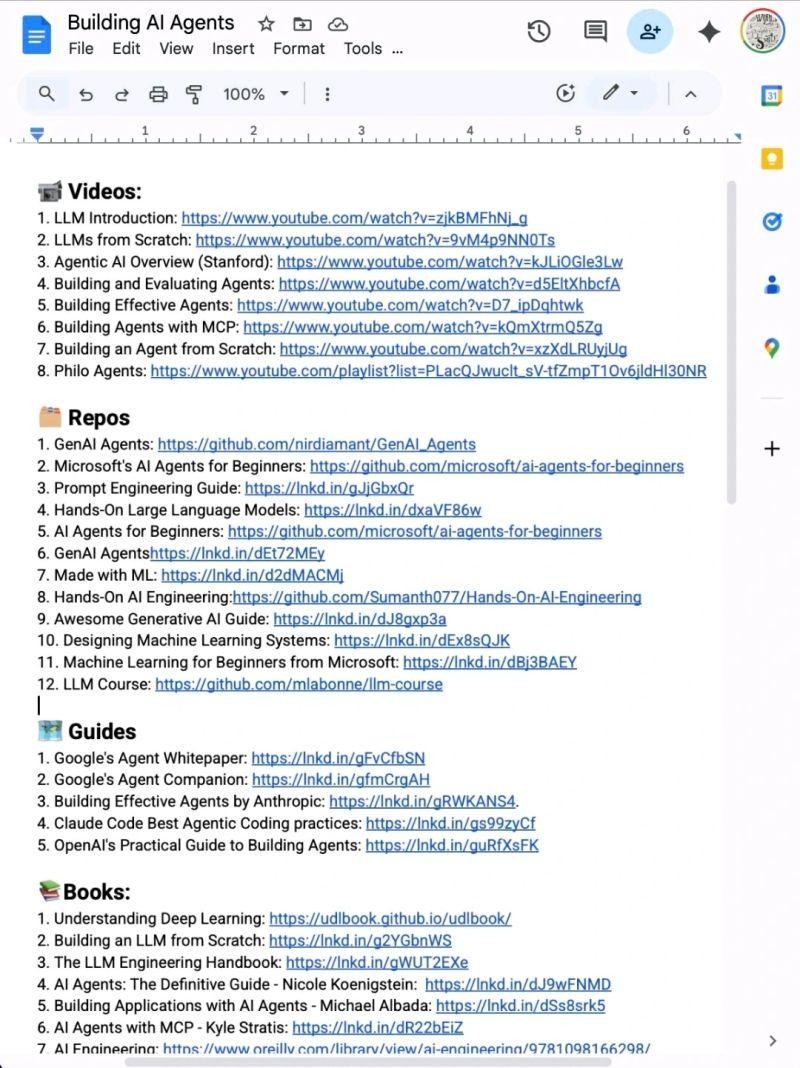
    Stop wasting hours trying to learn AI. 📘📚 I have already done it for you. With one list. Zero confusion. And no fluff 📹 Videos: 1. LLM Introduction: lnkd.in/dMqbaZdK 2. LLMs from Scratch: lnkd.in/dYYwEhYy 3. Agentic AI Overview (Stanford): lnkd.in/dArmMt2i 4. Building and Evaluating Agents: lnkd.in/dBWd2W8u 5. Building Effective Agents: lnkd.in/dHfdebqw 6. Building Agents with MCP: lnkd.in/dXuNHrRJ 7. Building an Agent from Scratch: lnkd.in/da3ANw3w 8. Philo Agents: lnkd.in/dq-BfZE5 🗂️ Repos 1. GenAI Agents: lnkd.in/d3UDtwwv 2. Microsoft's AI Agents for Beginners: lnkd.in/dHvTmJnv 3. Prompt Engineering Guide: lnkd.in/gJjGbxQr 4. Hands-On Large Language Models: lnkd.in/dxaVF86w 5. AI Agents for Beginners: lnkd.in/dHvTmJnv 6. GenAI Agentshttps://lnkd.in/dEt72MEy 7. Made with ML: lnkd.in/d2dMACMj 8. Hands-On AI Engineering:lnkd.in/dgQtRyk7 9. Awesome Generative AI Guide: lnkd.in/dJ8gxp3a 10. Designing Machine Learning Systems: lnkd.in/dEx8sQJK 11. Machine Learning for Beginners from Microsoft: lnkd.in/dBj3BAEY 12. LLM Course: lnkd.in/diZgGACG 🗺️ Guides 1. Google's Agent Whitepaper: lnkd.in/gFvCfbSN 2. Google's Agent Companion: lnkd.in/gfmCrgAH 3. Building Effective Agents by Anthropic: lnkd.in/gRWKANS4. 4. Claude Code Best Agentic Coding practices: lnkd.in/gs99zyCf 5. OpenAI's Practical Guide to Building Agents: lnkd.in/guRfXsFK 📚Books: 1. Understanding Deep Learning: lnkd.in/dgcB68Qt 2. Building an LLM from Scratch: lnkd.in/g2YGbnWS 3. The LLM Engineering Handbook: lnkd.in/gWUT2EXe 4. AI Agents: The Definitive Guide – Nicole Koenigstein: lnkd.in/dJ9wFNMD 5. Building Applications with AI Agents – Michael Albada: lnkd.in/dSs8srk5 6. AI Agents with MCP – Kyle Stratis: lnkd.in/dR22bEiZ 7. AI Engineering: lnkd.in/gi-mQcXa 📜 Papers 1. ReAct: lnkd.in/gRBH3ZRq 2. Generative Agents: lnkd.in/gsDCUsWm. 3. Toolformer: lnkd.in/gyzrege6 4. Chain-of-Thought Prompting: lnkd.in/gaK5CXzD. 🧑🏫 Courses: 1. HuggingFace's Agent Course: lnkd.in/gmTftTXV 2. MCP with Anthropic: lnkd.in/geffcwdq 3. Building Vector Databases with Pinecone: lnkd.in/gCS4sd7Y 4. Vector Databases from Embeddings to Apps: lnkd.in/gm9HR6_2 5. Agent Memory: lnkd.in/gNFpC542 Repost for your network ♻️

    → View original post on X — @nandodf, 2026-04-04 11:30 UTC

  • Model Analysis Guide for Local Deployment

    Here's the model analysis you need to figure out which local model to run on it.

    → View original post on X — @scobleizer

  • Google Agent Skills: Engineering Best Practices für AI Coding Agents
    Google Agent Skills: Engineering Best Practices für AI Coding Agents

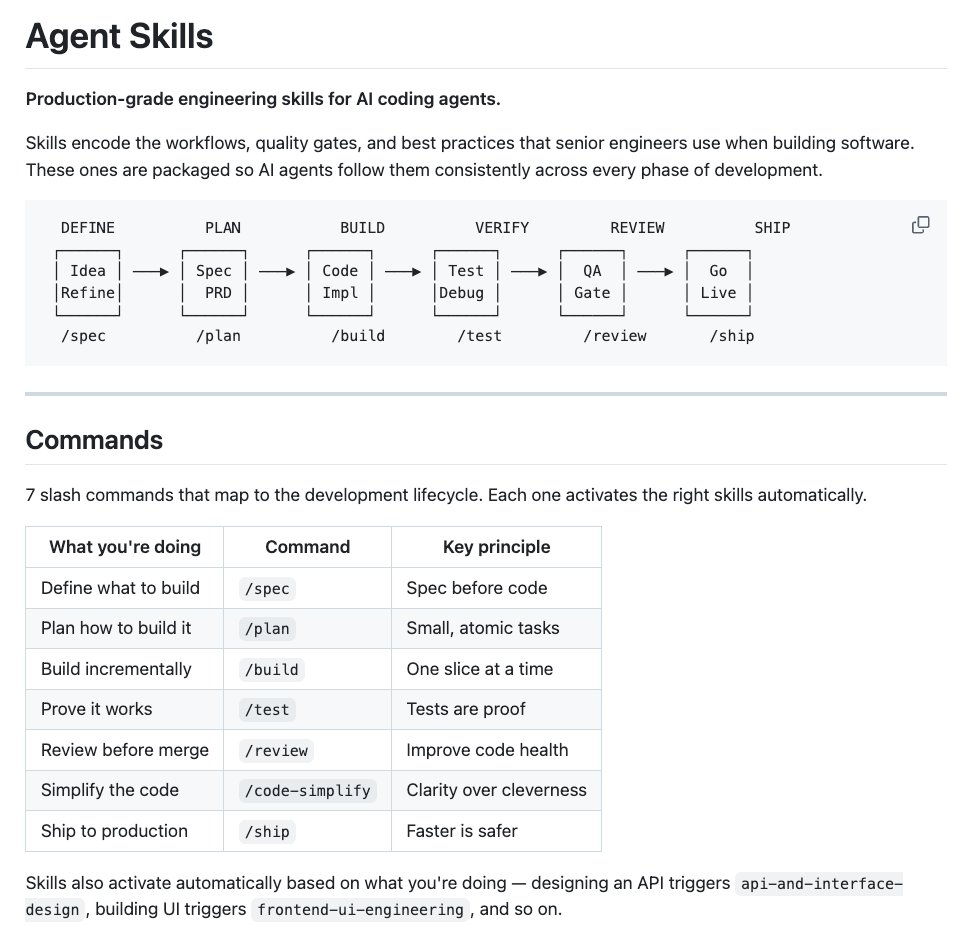
    If you found this useful, a like or RT goes a long way 🦾 Follow me → @datachaz for insights on LLMs, AI agents, and data science! Charly Wargnier (@DataChaz) 🚨 You need to see this. @addyosmani from Google just dropped his new Agent Skills and it's incredible. It brings 19 engineering skills + 7 commands to AI coding agents, all inspired by Google best practices 🤯 AI coding agents are powerful, but left alone, they take shortcuts. They skip specs, tests, and security reviews, optimizing for "done" over "correct." Addy built this to fix that. Each skill encodes the workflows and quality gates that senior engineers actually use: spec before code, test before merge, measure before optimize. The full lifecycle is covered: → Define – refine ideas, write specs before a single line of code → Plan – decompose into small, verifiable tasks → Build – incremental implementation, context engineering, clean API design → Verify – TDD, browser testing with DevTools, systematic debugging → Review – code quality, security hardening, performance optimization → Ship – git workflow, CI/CD, ADRs, pre-launch checklists Features 7 slash commands: (/spec, /plan, /build, /test, /review, /code-simplify, /ship) that map to this lifecycle. It works with: ✦ Claude Code ✦ Cursor ✦ Antigravity ✦ … and any agent accepting Markdown. Baking in Google-tier engineering culture (Shift Left, Chesterton's Fence, Hyrum's Law) directly into your agent's step-by-step workflow! `npx skills add addyosmani/agent-skills` Free and open-source. Repo link in 🧵↓ — https://nitter.net/DataChaz/status/2040357775830814798#m

    → View original post on X — @datachaz, 2026-04-04 09:16 UTC

  • Addy Osmani’s Agent Skills Repository Goes Open Source

    repo link: → github.com/addyosmani/agent-… Shoutout to @addyosmani for building this and making it open-source for the community! 🤗 Don't forget to drop a ⭐️ on to help boost visibility!

    → View original post on X — @datachaz, 2026-04-04 09:16 UTC