AI Dynamics

Global AI News Aggregator

@akshay_pachaar

  • Advisor Models: Pairing Weak and Strong AI for Cost-Efficient Intelligence
    Advisor Models: Pairing Weak and Strong AI for Cost-Efficient Intelligence

    this is one of the most important ideas in AI right now, and it just got two independent validations. yesterday, Anthropic shipped an "advisor tool" in the Claude API that lets Sonnet or Haiku consult Opus mid-task, only when the executor needs help. the benefit is straightforward: you get near Opus-level intelligence on the hard decisions while paying Sonnet or Haiku rates for everything else. frontier reasoning only kicks in when it's actually needed, not on every token. back in February, UC Berkeley published a paper called "Advisor Models" that trains a small 7B model with RL to generate per-instance advice for a frozen black-box model. same idea. two very different implementations. the paper's approach: take Qwen2.5 7B, train it with GRPO to generate natural language advice, and inject that advice into the prompt of a black-box model. the black-box model never changes. the advisor learns what to say to make it perform better. GPT-5 scores 31.2% on a tax-filing benchmark. add the trained advisor, it jumps to 53.6%. on SWE agent tasks, a trained advisor cuts Gemini 3 Pro's steps from 31.7 to 26.3 while keeping the same resolve rate. training is cheap too. you train with GPT-4o Mini, then swap in GPT-5 at inference. the advisor even transfers across families: a GPT-trained advisor improves Claude 4.5 Sonnet. Anthropic's advisor tool takes a different path to the same idea. Sonnet runs as executor, handles tools and iteration. when it hits something it can't resolve, it consults Opus, gets a plan or correction, and continues. Sonnet with Opus as advisor gained 2.7 points on SWE-bench Multilingual over Sonnet alone, while costing 11.9% less per task. Haiku with Opus scored 41.2% on BrowseComp, more than double its solo 19.7%. it's a one-line API change. advisor tokens bill at Opus rates, and the advisor typically generates only 400-700 tokens per call. blended cost stays well below running Opus end-to-end. both approaches point at the same thing: you don't need the most powerful model on every token. you need it at the right moments, for the right inputs. Paper: arxiv.org/abs/2510.02453 Code: github.com/az1326/advisor-mo… Claude (@claudeai) We're bringing the advisor strategy to the Claude Platform. Pair Opus as an advisor with Sonnet or Haiku as an executor, and get near Opus-level intelligence in your agents at a fraction of the cost. — https://nitter.net/claudeai/status/2042308622181339453#m

    → View original post on X — @akshay_pachaar, 2026-04-10 05:46 UTC

  • Understanding AI Agents: Components and Orchestration Explained

    A simple way to think about AI agents: LLM = reasoning Tools = actions Memory = context Orchestration = the loop The first three are components. The last one is what makes them an agent.

    → View original post on X — @akshay_pachaar, 2026-04-09 20:21 UTC

  • Building AI Brains: Why Local First Architecture Matters

    Absolutely! If you're building an AI brain, you cannot send the entire data to any API. Local first is a must.

    → View original post on X — @akshay_pachaar,

  • Open-Source Claude Alternative with Local AI and Voice Support

    If you found it insightful, reshare with your network. Find me → @akshay_pachaar ✔️ For more insights and tutorials on LLMs, AI Agents, and Machine Learning! Akshay 🚀 (@akshay_pachaar) Another blow to Anthropic! Devs built a free and better Claude Cowork alternative: – 100% local – voice-enabled – works with any LLM – MCP tool extensibility – obsidian-compatible vault – background agents & web search – automatic knowledge graph creation 100% open-source. — https://nitter.net/akshay_pachaar/status/2041856590341677378#m

    → View original post on X — @akshay_pachaar, 2026-04-08 12:32 UTC

  • Free Open-Source Claude Alternative with Local AI and MCP Support

    Another blow to Anthropic! Devs built a free and better Claude Cowork alternative: – 100% local – voice-enabled – works with any LLM – MCP tool extensibility – obsidian-compatible vault – background agents & web search – automatic knowledge graph creation 100% open-source.

    → View original post on X — @akshay_pachaar, 2026-04-08 12:32 UTC

  • LLMs as CPUs: Understanding Agent Harness Infrastructure
    LLMs as CPUs: Understanding Agent Harness Infrastructure

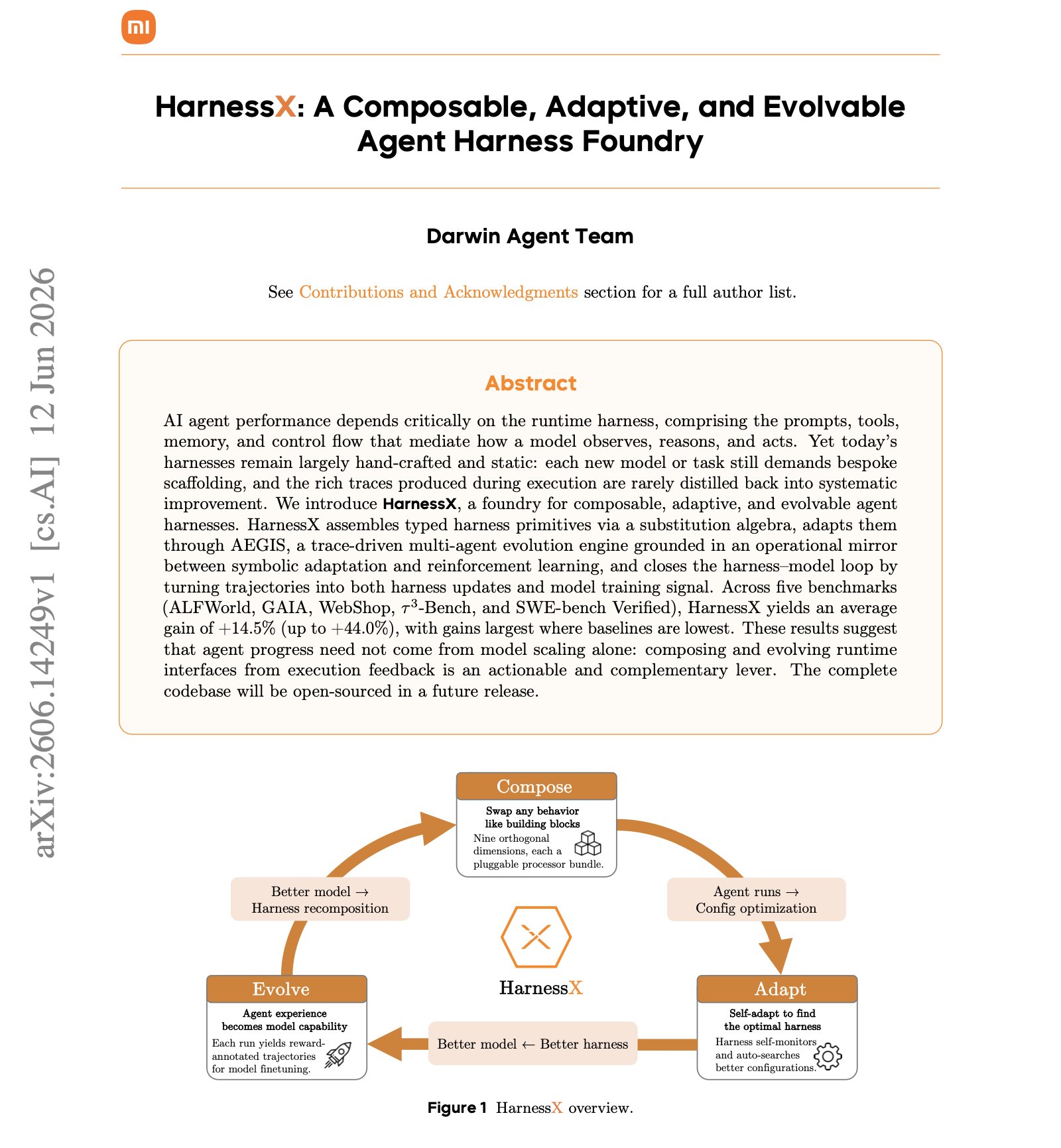
    A raw LLM is just like a CPU without OS. It can compute. But it can't do anything useful on its own. This analogy is the clearest way I've found to understand what an agent harness actually does. Here's the mapping: • 𝗖𝗣𝗨 → 𝗟𝗟𝗠 (model weights). The raw compute engine. Powerful, but useless without infrastructure around it. • 𝗥𝗔𝗠 → 𝗖𝗼𝗻𝘁𝗲𝘅𝘁 𝘄𝗶𝗻𝗱𝗼𝘄. Fast, always available, but limited. When it fills up, you start losing things. • 𝗛𝗮𝗿𝗱 𝗱𝗶𝘀𝗸 → 𝗩𝗲𝗰𝘁𝗼𝗿 𝗗𝗕 / 𝗹𝗼𝗻𝗴-𝘁𝗲𝗿𝗺 𝘀𝘁𝗼𝗿𝗮𝗴𝗲. Large capacity, but slow to access. You retrieve from it, not compute in it. • 𝗗𝗲𝘃𝗶𝗰𝗲 𝗱𝗿𝗶𝘃𝗲𝗿𝘀 → 𝗧𝗼𝗼𝗹 𝗶𝗻𝘁𝗲𝗴𝗿𝗮𝘁𝗶𝗼𝗻𝘀. The interfaces that let the model interact with the outside world. Code execution, web search, file I/O. • 𝗢𝗽𝗲𝗿𝗮𝘁𝗶𝗻𝗴 𝘀𝘆𝘀𝘁𝗲𝗺 → 𝗔𝗴𝗲𝗻𝘁 𝗵𝗮𝗿𝗻𝗲𝘀𝘀. This is the key layer. It manages everything: which tools to call, what fits in memory, when to retrieve, how to recover from errors, and when to stop. And then there's the 𝗮𝗽𝗽𝗹𝗶𝗰𝗮𝘁𝗶𝗼𝗻 layer. That's the "agent" itself. Not a piece of software you install, but emergent behavior that arises when the OS does its job well. This is why two products using the exact same model can perform completely differently. LangChain changed only their harness infrastructure (same model, same weights) and jumped from outside the top 30 to rank 5 on TerminalBench 2.0. The model didn't improve. The operating system around it did. The article below is a deep dive on agent harness engineering, covering the orchestration loop, tools, memory, context management, and everything else that transforms a stateless LLM into a capable agent. Akshay 🚀 (@akshay_pachaar) x.com/i/article/204073208484… — https://nitter.net/akshay_pachaar/status/2041146899319971922#m

    → View original post on X — @akshay_pachaar, 2026-04-07 08:30 UTC

  • BM25: The Powerful 30-Year-Old Search Algorithm Still Beating Vectors
    BM25: The Powerful 30-Year-Old Search Algorithm Still Beating Vectors

    Stop using vector search everywhere! A 30-year-old algorithm with zero training, zero embeddings, and zero fine-tuning still powers Elasticsearch, OpenSearch, and most production search systems today. It's called BM25. Let me explain what makes it so powerful: Imagine you're searching for "transformer attention mechanism" in a library of ML papers. BM25 asks three simple questions: "How rare is this word?" Every paper contains "the" and "is", which makes it useless. But "transformer" is specific and informative. BM25 boosts rare words and ignores the noise. → This is IDF(qᵢ) in the formula "How many times does it appear?" If "attention" appears 10 times in a paper, that's a good sign. But 10 vs 100 occurrences won't make much difference. BM25 applies diminishing returns. → This is f(qᵢ, D) combined with k₁ that controls saturation "Is this document unusually long?" A 50-page paper will naturally contain more keywords than a 5-page paper. BM25 levels the playing field so longer documents don't cheat their way to the top. → This is |D|/avgdl controlled by parameter b Three questions. No neural networks. No training data. Just elegant math (refer to the image below) The best part: BM25 excels at exact keyword matching – something embeddings often struggle with. If your user searches for "error code 5012," embeddings might return semantically similar results. BM25 will find the exact match. This is why hybrid search exists. Top RAG systems today combine BM25 with vector search. You get the best of both worlds: semantic understanding AND precise keyword matching. So before you throw GPUs at every search problem, consider BM25. It might already solve your problem, or make your semantic search even better when combined.

    → View original post on X — @akshay_pachaar, 2026-04-05 13:02 UTC

  • 8 Building Blocks of Effective Claude Prompts
    8 Building Blocks of Effective Claude Prompts

    If you found it insightful, reshare with your network. Find me → @akshay_pachaar ✔️ For more insights and tutorials on LLMs, AI Agents, and Machine Learning! nitter.net/akshay_pachaar/status/… Akshay 🚀 (@akshay_pachaar) The anatomy of a Claude prompt: The difference between a mediocre Claude output and a great one almost always comes down to how you structure your prompt. Not the specific words you choose. Not some secret phrasing. Just a clear, repeatable structure that gives Claude exactly what it needs to do the job well. Here's how a well-built Claude prompt breaks down into 8 building blocks, each doing one job: 1️⃣ Role Tell Claude who it is before telling it what to do. "You are a [ROLE] with expertise in [DOMAIN]. Your tone should be [TONE]. Your audience is [AUDIENCE]." Setting a role in the system prompt changes how Claude reasons, what it prioritizes, and how it communicates. A "senior backend engineer" writes differently than a "technical copywriter," and Claude picks up on that distinction immediately. 2️⃣ Task State what you want and what success looks like, in the same breath. "I need you to [SPECIFIC TASK] so that [SUCCESS CRITERIA]." The "so that" part is what people skip, and it's the part that matters. It gives Claude a way to evaluate its own output. Without it, Claude is guessing what "good" means. Be direct, skip the preamble, and cut the fluff. 3️⃣ Context This is where you feed Claude everything it needs to do the job well. Wrap it in XML tags like <context> and </context>, then paste your documents, data, or background inside. One thing that dramatically improves quality: put long documents at the top of your prompt and your actual query at the end. Anthropic's own testing shows this can improve response quality by up to 30%, especially with complex, multi-document inputs. 4️⃣ Examples Nothing steers output quality like showing Claude what "good" looks like. Provide 3-5 input/output pairs. Cover normal cases AND edge cases. Wrap them in <examples> tags so Claude doesn't confuse them with instructions. Claude pays extremely close attention to examples. If your example has a quirk you didn't intend, Claude will replicate it. So make sure every example models the behavior you actually want. 5️⃣ Thinking For anything requiring reasoning, analysis, or multi-step logic, ask Claude to think before answering. "Before answering, think through this step by step. Use <thinking> tags for your reasoning. Put only your final answer in <answer> tags." This separates the messy reasoning from the clean output. You get to see how Claude arrived at its answer without that reasoning cluttering the final result. 6️⃣ Constraints Every good prompt has guardrails. "Never [thing to avoid]. Always [thing to ensure]. If you are about to break a rule, stop and tell me." That last line is underrated. It turns Claude into a collaborator instead of a blind executor. Instead of silently violating a constraint, Claude flags the conflict and lets you decide. 7️⃣ Output Format Don't leave the format to chance. "Return your response as [JSON / markdown / table / prose]. Use this exact structure: [structure template]." If you want JSON, show the exact schema. If you want markdown, show the heading structure. If you want a table, define the columns. The more specific you are about shape, the less time you spend reformatting afterward. 8️⃣ Prefill This one is API-specific, but incredibly powerful. You can pre-fill the start of Claude's response to skip preamble and lock in the format. Claude will continue from exactly where you left off. No "Sure, I'd be happy to help!" opening, no throat-clearing, just clean output from the first token. Here's the thing people get wrong about prompting: they think it's about finding the right words. It's actually about giving Claude the right structure. If you want to go deeper, I wrote a detailed article covering the anatomy of the .claude/ folder, a complete guide to CLAUDE(.)md, hooks, skills, agents, and permissions, and how to set them all up properly. Link in the next tweet. — https://nitter.net/akshay_pachaar/status/2040414818696634635#m

    → View original post on X — @akshay_pachaar, 2026-04-04 20:24 UTC

  • Anatomy of the .claude/ folder explained

    Anatomy of the .claude/ folder: nitter.net/akshay_pachaar/status/… Akshay 🚀 (@akshay_pachaar) x.com/i/article/203496196714… — https://nitter.net/akshay_pachaar/status/2035341800739877091#m

    → View original post on X — @akshay_pachaar, 2026-04-04 13:03 UTC