AI Dynamics

Global AI News Aggregator

About

@akshay_pachaar

  • Anatomy of the .claude/ folder explained

    Anatomy of the .claude/ folder: nitter.net/akshay_pachaar/status/โ€ฆ Akshay ๐Ÿš€ (@akshay_pachaar) x.com/i/article/203496196714โ€ฆ โ€” https://nitter.net/akshay_pachaar/status/2035341800739877091#m

    โ†’ View original post on X โ€” @akshay_pachaar, 2026-04-04 13:03 UTC

  • 8 Building Blocks of Effective Claude Prompts
    8 Building Blocks of Effective Claude Prompts

    The anatomy of a Claude prompt: The difference between a mediocre Claude output and a great one almost always comes down to how you structure your prompt. Not the specific words you choose. Not some secret phrasing. Just a clear, repeatable structure that gives Claude exactly what it needs to do the job well. Here's how a well-built Claude prompt breaks down into 8 building blocks, each doing one job: 1๏ธโƒฃ Role Tell Claude who it is before telling it what to do. "You are a [ROLE] with expertise in [DOMAIN]. Your tone should be [TONE]. Your audience is [AUDIENCE]." Setting a role in the system prompt changes how Claude reasons, what it prioritizes, and how it communicates. A "senior backend engineer" writes differently than a "technical copywriter," and Claude picks up on that distinction immediately. 2๏ธโƒฃ Task State what you want and what success looks like, in the same breath. "I need you to [SPECIFIC TASK] so that [SUCCESS CRITERIA]." The "so that" part is what people skip, and it's the part that matters. It gives Claude a way to evaluate its own output. Without it, Claude is guessing what "good" means. Be direct, skip the preamble, and cut the fluff. 3๏ธโƒฃ Context This is where you feed Claude everything it needs to do the job well. Wrap it in XML tags like <context> and </context>, then paste your documents, data, or background inside. One thing that dramatically improves quality: put long documents at the top of your prompt and your actual query at the end. Anthropic's own testing shows this can improve response quality by up to 30%, especially with complex, multi-document inputs. 4๏ธโƒฃ Examples Nothing steers output quality like showing Claude what "good" looks like. Provide 3-5 input/output pairs. Cover normal cases AND edge cases. Wrap them in <examples> tags so Claude doesn't confuse them with instructions. Claude pays extremely close attention to examples. If your example has a quirk you didn't intend, Claude will replicate it. So make sure every example models the behavior you actually want. 5๏ธโƒฃ Thinking For anything requiring reasoning, analysis, or multi-step logic, ask Claude to think before answering. "Before answering, think through this step by step. Use <thinking> tags for your reasoning. Put only your final answer in <answer> tags." This separates the messy reasoning from the clean output. You get to see how Claude arrived at its answer without that reasoning cluttering the final result. 6๏ธโƒฃ Constraints Every good prompt has guardrails. "Never [thing to avoid]. Always [thing to ensure]. If you are about to break a rule, stop and tell me." That last line is underrated. It turns Claude into a collaborator instead of a blind executor. Instead of silently violating a constraint, Claude flags the conflict and lets you decide. 7๏ธโƒฃ Output Format Don't leave the format to chance. "Return your response as [JSON / markdown / table / prose]. Use this exact structure: [structure template]." If you want JSON, show the exact schema. If you want markdown, show the heading structure. If you want a table, define the columns. The more specific you are about shape, the less time you spend reformatting afterward. 8๏ธโƒฃ Prefill This one is API-specific, but incredibly powerful. You can pre-fill the start of Claude's response to skip preamble and lock in the format. Claude will continue from exactly where you left off. No "Sure, I'd be happy to help!" opening, no throat-clearing, just clean output from the first token. Here's the thing people get wrong about prompting: they think it's about finding the right words. It's actually about giving Claude the right structure. If you want to go deeper, I wrote a detailed article covering the anatomy of the .claude/ folder, a complete guide to CLAUDE(.)md, hooks, skills, agents, and permissions, and how to set them all up properly. Link in the next tweet.

    โ†’ View original post on X โ€” @akshay_pachaar, 2026-04-04 13:02 UTC

  • 8 RAG Architectures for AI Engineers: Complete Guide
    8 RAG Architectures for AI Engineers: Complete Guide

    8 RAG architectures for AI Engineers: (explained with usage) 1) Naive RAG – Retrieves documents purely based on vector similarity between the query embedding and stored embeddings. – Works best for simple, fact-based queries where direct semantic matching suffices. 2) Multimodal RAG – Handles multiple data types (text, images, audio, etc.) by embedding and retrieving across modalities. – Ideal for cross-modal retrieval tasks like answering a text query with both text and image context. 3) HyDE (Hypothetical Document Embeddings) – Queries are not semantically similar to documents. – This technique generates a hypothetical answer document from the query before retrieval. – Uses this generated documentโ€™s embedding to find more relevant real documents. 4) Corrective RAG – Validates retrieved results by comparing them against trusted sources (e.g., web search). – Ensures up-to-date and accurate information, filtering or correcting retrieved content before passing to the LLM. 5) Graph RAG – Converts retrieved content into a knowledge graph to capture relationships and entities. – Enhances reasoning by providing structured context alongside raw text to the LLM. 6) Hybrid RAG – Combines dense vector retrieval with graph-based retrieval in a single pipeline. – Useful when the task requires both unstructured text and structured relational data for richer answers. 7) Adaptive RAG – Dynamically decides if a query requires a simple direct retrieval or a multi-step reasoning chain. – Breaks complex queries into smaller sub-queries for better coverage and accuracy. 8) Agentic RAG – Uses AI agents with planning, reasoning (ReAct, CoT), and memory to orchestrate retrieval from multiple sources. – Best suited for complex workflows that require tool use, external APIs, or combining multiple RAG techniques. ๐Ÿ‘‰ Over to you: Which RAG architecture do you use the most? _____ Share this with your network if you found this insightful โ™ป๏ธ Find me โ†’ @akshay_pachaar โœ”๏ธ For more insights and tutorials on LLMs, AI Agents, and Machine Learning!

    โ†’ View original post on X โ€” @akshay_pachaar, 2026-04-03 12:54 UTC

  • Claude Skills Context Engineering: 3-Layer System for Hundreds of Skills
    Claude Skills Context Engineering: 3-Layer System for Hundreds of Skills

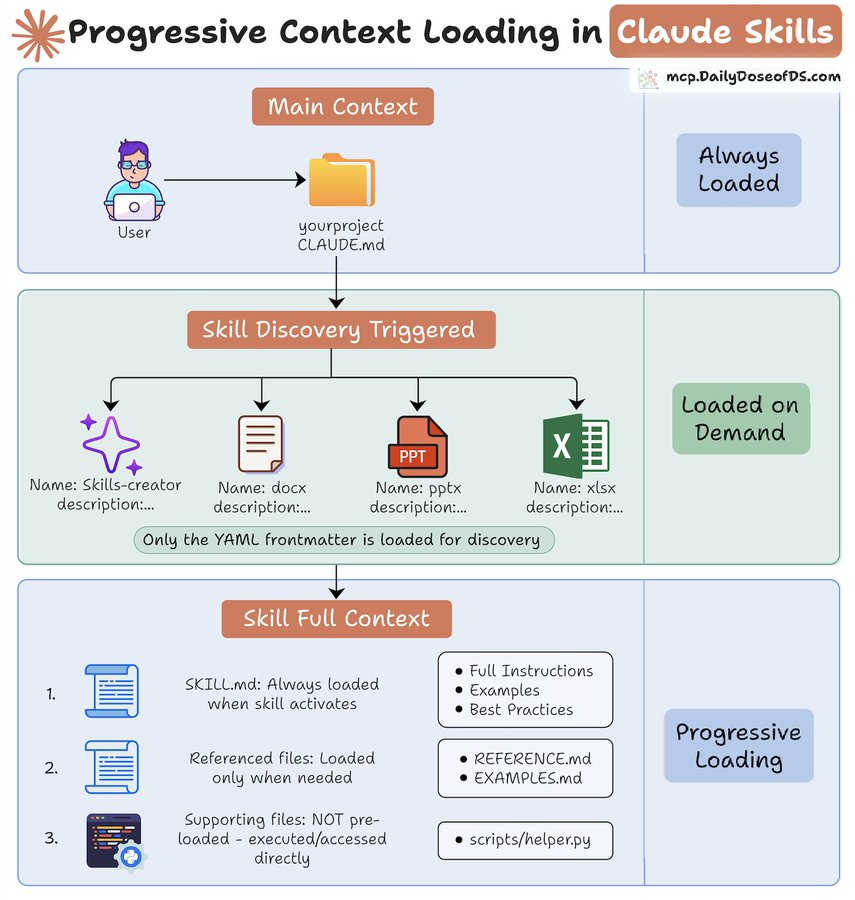
    Context engineering in Claude Skills is GENIUS! Skills use a 3-layer context management system that lets it use 100s of skills without hitting context limits. Here's how it works: > Layer 1: Main Context – Always loaded, it contains the project configuration. > Layer 2: Skill Metadata – Comprises only the YAML frontmatter, about 2-3 lines (< 200 tokens). > Layer 3: Active Skill Context – SKILL. md files and associated documentation are loaded as needed. Supporting files like scripts and templates aren't pre-loaded but accessed directly when in use, consuming zero tokens. This architecture supports hundreds of skills without breaching context limits. The article below is a complete guide to ๐—–๐—Ÿ๐—”๐—จ๐——๐—˜.๐—บ๐—ฑ, hooks, skills, agents, and permissions, and how to set them up properly. Akshay ๐Ÿš€ (@akshay_pachaar) x.com/i/article/203496196714โ€ฆ โ€” https://nitter.net/akshay_pachaar/status/2035341800739877091#m

    โ†’ View original post on X โ€” @akshay_pachaar, 2026-04-03 08:07 UTC

  • Claude Code Unpacked: Complete Visual Walkthrough of 500k-Line Codebase

    Claude Code Unpacked! Visual walkthrough of the entire 500k-line leaked codebase. What happens when you type a message: – the agent loop – 50+ tools – multi-agent orchestration – unreleased features Want to understand the internals or build your own agent harness? start here:

    โ†’ View original post on X โ€” @akshay_pachaar, 2026-04-02 13:36 UTC

  • Plan-Execute-Verify: The AI Coding Loop for Faster Shipping
    Plan-Execute-Verify: The AI Coding Loop for Faster Shipping

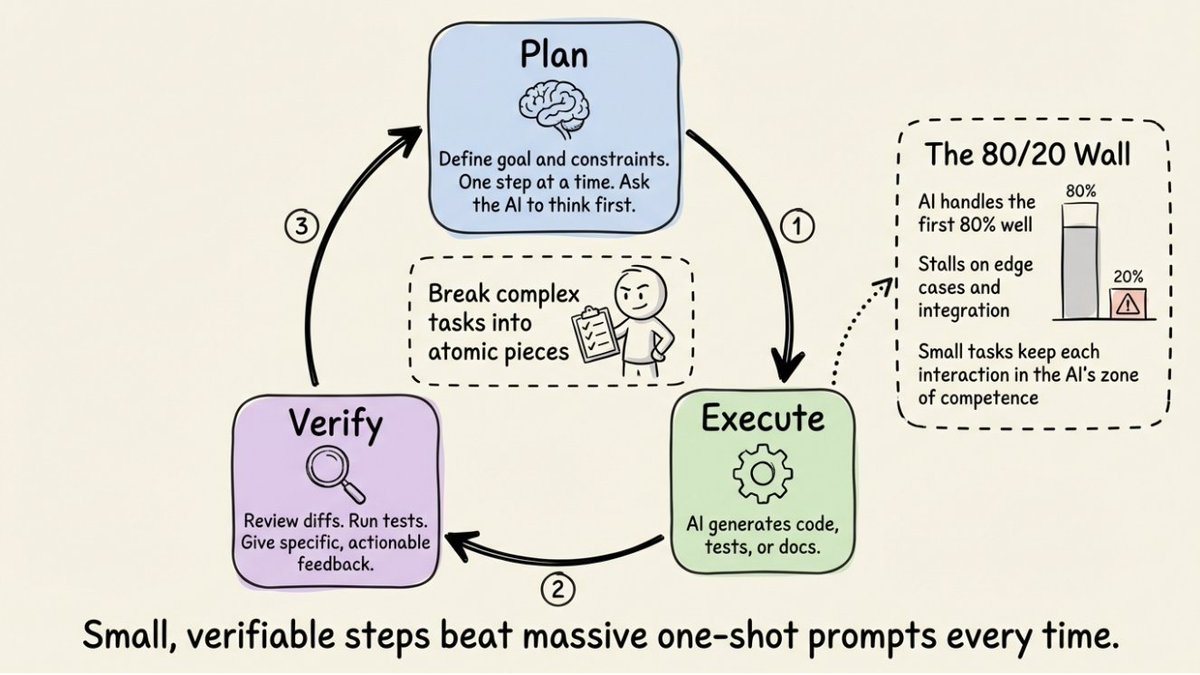
    AI coding has a cheat code. It's not a tool, a model, or a better prompt template. It's a shift in how you structure the work. Most developers write one big prompt, hit enter, and hope for the best. When the output isn't right, they describe the problem, the AI "fixes" it, and a new problem shows up. Three rounds later, they're further from where they started. The developers who ship fastest never ask the AI to do everything at once. They run every task through a simple loop: ๐—ฃ๐—น๐—ฎ๐—ป โ†’ ๐—˜๐˜…๐—ฒ๐—ฐ๐˜‚๐˜๐—ฒ โ†’ ๐—ฉ๐—ฒ๐—ฟ๐—ถ๐—ณ๐˜† It starts with the ๐—ฃ๐—น๐—ฎ๐—ป. Before the AI writes a single line of code, define the goal and constraints for just the next step. Not the whole feature, just the next piece. Even better, ask the AI to reason through the approach first. You catch bad assumptions before they become bad code. Then you ๐—˜๐˜…๐—ฒ๐—ฐ๐˜‚๐˜๐—ฒ. Let the AI generate, but keep the scope tight. Not "build the entire auth system." Instead: "Add JWT verification middleware that reads from the Authorization header and returns 401 on expired tokens." Then you ๐—ฉ๐—ฒ๐—ฟ๐—ถ๐—ณ๐˜†. Review the diffs. Run the tests. Give specific, actionable feedback. "That's wrong" is a terrible prompt. "The middleware should return 401, not 403, and check the Authorization header instead of X-Token" gives the AI everything it needs to course-correct in one shot. ๐—ฉ๐—ฎ๐—ด๐˜‚๐—ฒ ๐—ณ๐—ฒ๐—ฒ๐—ฑ๐—ฏ๐—ฎ๐—ฐ๐—ธ ๐—ฐ๐—ฟ๐—ฒ๐—ฎ๐˜๐—ฒ๐˜€ ๐—น๐—ผ๐—ผ๐—ฝ๐˜€. ๐—ฃ๐—ฟ๐—ฒ๐—ฐ๐—ถ๐˜€๐—ฒ ๐—ณ๐—ฒ๐—ฒ๐—ฑ๐—ฏ๐—ฎ๐—ฐ๐—ธ ๐—ฐ๐—น๐—ผ๐˜€๐—ฒ๐˜€ ๐˜๐—ต๐—ฒ๐—บ. Then you go back to Plan and repeat. This works because AI is excellent at small, well-defined tasks and unreliable at large, ambiguous ones. The mental shift: you're not trying to write the perfect prompt. You're building a rhythm of small, verifiable steps that works the same way across any tool. Terminal agent, IDE copilot, browser-based builder. ๐—ง๐—ต๐—ฒ ๐—น๐—ผ๐—ผ๐—ฝ ๐—ถ๐˜€ ๐˜๐—ต๐—ฒ ๐—ฐ๐—ผ๐—ป๐˜€๐˜๐—ฎ๐—ป๐˜. ๐—ฆ๐˜๐—ผ๐—ฝ ๐˜„๐—ฟ๐—ถ๐˜๐—ถ๐—ป๐—ด ๐—ฏ๐—ถ๐—ด ๐—ฝ๐—ฟ๐—ผ๐—บ๐—ฝ๐˜๐˜€. ๐—ฆ๐˜๐—ฎ๐—ฟ๐˜ ๐—ฟ๐˜‚๐—ป๐—ป๐—ถ๐—ป๐—ด ๐˜€๐—บ๐—ฎ๐—น๐—น ๐—น๐—ผ๐—ผ๐—ฝ๐˜€. The article below covers Vibe coding best practices with hands-on examples. Do check it out. Akshay ๐Ÿš€ (@akshay_pachaar) x.com/i/article/203930514901โ€ฆ โ€” https://nitter.net/akshay_pachaar/status/2039326670797369346#m

    โ†’ View original post on X โ€” @akshay_pachaar, 2026-04-02 07:40 UTC

  • Onyx’s Superior Data Indexing vs Claude’s MCP Connectors

    Been using this over the past few weeks and I noticed that the connectors are built far better than what I found in Claude. Essentially, unlike Claude's MCP connectors that query your tools at runtime, Onyx actually indexes and continuously syncs with internal data. So when I

    โ†’ View original post on X โ€” @akshay_pachaar

  • Convergence Toward Continual Learning and Self-Evolving Systems

    things are converging towards continual learning and self-evolving systems.

    โ†’ View original post on X โ€” @akshay_pachaar