Blog: minimax.io/news/minimax-m27-…
→ View original post on X — @akshay_pachaar, 2026-03-31 13:07 UTC
By
–
Blog: minimax.io/news/minimax-m27-…
→ View original post on X — @akshay_pachaar, 2026-03-31 13:07 UTC
By
–
The first AI that improves without retraining. (it rewrites its own agent harness) Every developer I know has one thing in common: they obsess over their setup. The terminal, the scripts, the shortcuts. They don't just write code. They constantly refine how they work. The code gets better because the environment gets better. MiniMax just released M2.7, and I think the most interesting thing about it isn't a benchmark number. It's the fact that M2.7 improves its own agent harness. Autonomously. Let's break this down: When you run an AI agent today, it operates inside a "harness." Think of it as the agent's operating environment: the skills it can invoke, the tools it can call, its memory, and the rules it follows. Normally, a human engineer builds this harness, and the agent operates within it. The harness stays fixed. M2.7 treats its harness as something it can rewrite. Here's what the loop looks like: – The agent runs a task and analyzes where things went wrong – It plans changes to its own scaffold: skills, MCPs, memory – It applies those changes, runs evaluations against a benchmark – It compares the results and decides whether to keep or revert – It writes self-criticism into memory so the next round starts smarter Then it loops back and does it again. And again. Think of it like a developer who finishes a project, writes a retrospective, restructures their workflow based on what they learned, and shows up the next day with a better setup. Except the developer here is the model itself. MiniMax ran this self-optimization loop for over 100 rounds internally. Along the way, the model discovered things on its own: it systematically searched for optimal sampling parameters (temperature, penalties), wrote workflow-specific guidelines for itself (like automatically checking for the same bug pattern in other files after a fix), and even added loop detection to avoid getting stuck. No human had to tell it to do any of this. They also tested this in a more controlled setting. They had M2.7 compete in 22 ML competitions from OpenAI's MLE Bench Lite. Each trial ran for 24 hours, fully autonomous. After each iteration, the agent wrote a memory file and performed self-criticism, feeding those insights into the next round. With every round, the ML models it trained achieved higher medal rates. The best run earned 9 gold medals. I've summarized the self-evolving architecture in the graphic below. The reason I find this compelling: this isn't about making a smarter model. It's about making a model that makes itself smarter. The weights never change. What changes is the system around it: better skills, better memory, better workflow rules. And that distinction matters because it means the improvement loop can run continuously without any retraining. We're entering a phase where agents don't just follow instructions. They redesign their own playbook. If you want to learn more, I've shared a link to their official blog post in the next tweet.
→ View original post on X — @akshay_pachaar, 2026-03-31 13:07 UTC
By
–
Anatomy of the .claude/ folder: nitter.net/akshay_pachaar/status/… Akshay 🚀 (@akshay_pachaar) x.com/i/article/203496196714… — https://nitter.net/akshay_pachaar/status/2035341800739877091#m
→ View original post on X — @akshay_pachaar, 2026-03-30 13:15 UTC
By
–
Claude vs. Claude Code vs. Cowork. If you've been confused about which one to use and when, this post will clear that up in under two minutes. Anthropic now offers three distinct ways to interact with Claude, and each one targets a fundamentally different workflow. Think of it as: Chat for thinking, Code for building, and Cowork for doing. Here's a quick breakdown: 1️⃣ Claude Chat This is the conversational AI assistant most people already know. You type a prompt, Claude responds, and you iterate together. – Turn rough ideas into structured plans through conversation – Write emails, reports, essays, and long-form content – Research and summarize complex topics in minutes – Analyze documents, PDFs, and images – Build interactive prototypes through Artifacts The key here is that everything happens through conversation. You're thinking with Claude, not delegating work to it. It's available on every device, has a free tier, and supports persistent memory across sessions. The tradeoff is that it has no direct access to your local files (upload only), and it can't generate raster images natively. 2️⃣ Claude Code This is a terminal-native coding agent. You describe what you want in plain English, and Claude reads your codebase, writes code, runs tests, fixes errors, and ships the result. – Build and debug entire features across the full codebase – Write, run, and fix tests automatically – Manage git workflows and create pull requests – Spawn multiple parallel agents working on different parts of a task simultaneously It handles the full development cycle end to end, from planning to execution to testing. With the CLAUDE(.)md configuration file, you can teach it your project's conventions, patterns, and constraints so it writes code the way your team expects. The tradeoff is a steeper learning curve compared to Chat, and token costs can add up during heavy sessions. 3️⃣ Claude Cowork This is the newest addition. Anthropic describes it as Claude Code for the rest of your work. It's an agentic desktop assistant that automates file management and repetitive tasks through a GUI. You describe an outcome, and Claude plans, executes, and delivers finished work: formatted documents, organized file systems, spreadsheets with working formulas, and synthesized research. – Direct local file access and editing (no upload/download cycle) – Schedule recurring tasks automatically – Assign tasks remotely via Dispatch from your phone – Computer Use lets Claude control your screen directly It runs inside a sandboxed virtual machine on your computer, so Claude can only access folders you explicitly grant. You don't need to know how to code to use it. The tradeoff is that your computer must stay awake for tasks to run, and it's still in research preview. Here's how to think about choosing between them: → If you need to think through a problem or get writing/research help, use Chat → If you're building software and want an autonomous coding partner, use Code → If you have a clearly defined deliverable that involves local files and desktop workflows, use Cowork All three are included in the same subscription starting at $20/month, which makes it one of the highest-leverage subscriptions in productivity software right now. I've put together a visual below that maps the workflow of each product side by side. If you want to go deeper into Claude Code specifically, I wrote a detailed article covering the anatomy of the .claude/ folder, a complete guide to CLAUDE(.)md, custom commands, skills, agents, and permissions, and how to set them all up properly. Link in the next tweet.
→ View original post on X — @akshay_pachaar, 2026-03-30 13:15 UTC
By
–
Learn more about #MongoDB Vector Search: fandf.co/4qyyKcb It makes sure everything we discussed is executed before the vector math, so you only run similarity scoring on relevant candidates. If you're building anything where users make typos, need location-based results, or expect your search to be both precise and forgiving at the same time, Lexical Prefilters solve it. It's part of the vectorSearch operator (inside the $search stage) in Atlas – so if you're still on knnBeta, this is what's next. Thank you MongoDB for working with me on this one.
→ View original post on X — @akshay_pachaar, 2026-03-30 07:37 UTC
By
–
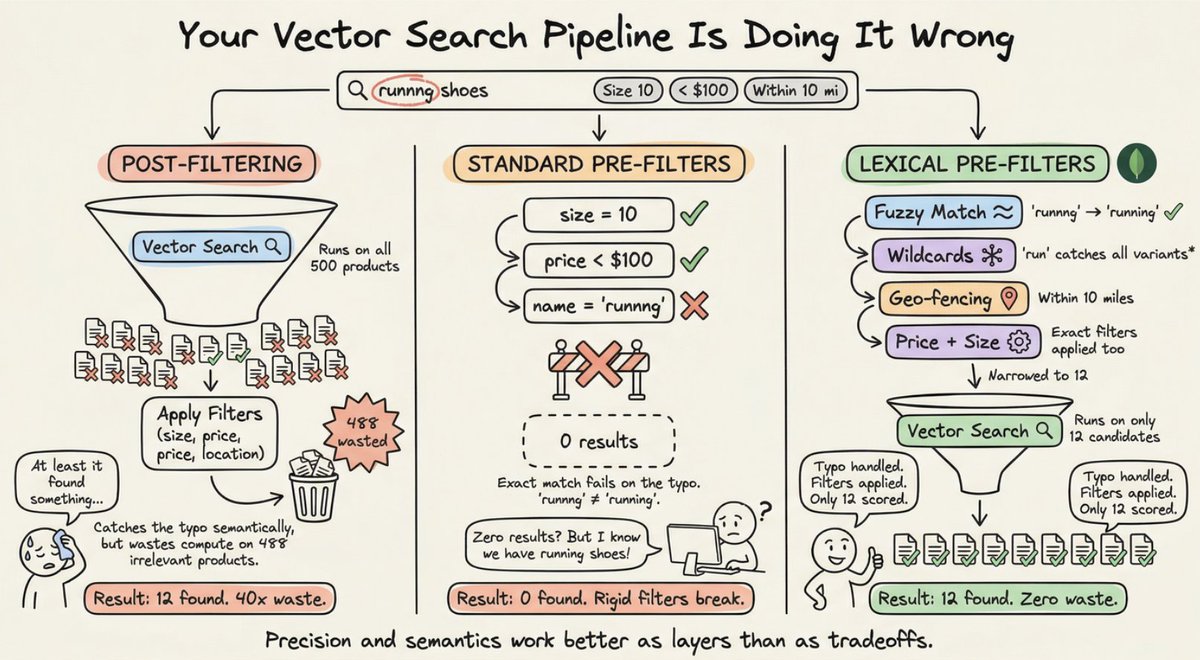
A simple technique can make your vector search 10x cheaper. And you probably haven't heard of it yet. Consider this: A user searches "runnng shoes" (yes, misspelled) looking for size 10, within 10 miles, under $100. Vector search runs on 500 products, then the filters apply – and only 12 match the size, location and price. That's 500 similarity calculations to surface 12 results. And if the typo didn't get caught? Those 12 might not even include what the user wanted. Standard pre-filters would return ZERO results for "runnng" – it's not an exact match. Post-filtering catches the typo semantically but wastes compute on 488 irrelevant products first. This is how search pipelines typically work. Most teams have accepted this as normal – run vector search first to get semantically relevant results, then apply filters afterward. Standard vector search does support basic pre-filters (like "price < $100" or "size = 10"), but those filters are rigid, only handling exact matches and simple comparisons. They can't handle typos, wildcards, or complex text analysis. So you're stuck: use exact-match pre-filters and get zero results for typos, or post-filter massive datasets and waste compute. What you actually need is filtering that handles precision and fuzziness together – precise enough for "size 10" and "under $100," flexible enough to match "runnng to running," and smart enough to handle complex geospatial queries like "within 10 miles." And it needs to happen before vector search runs, not after. But the bigger point is this: – Post-filter: search everything, hope for the best.
– Pre-filter with lexical intelligence: search only what matters, get it right. Precision and semantics work better as layers than as tradeoffs. Now that you see the problem, let me show you what the fix actually looks like in practice 👇 This is ex [Translated from EN to English]
→ View original post on X — @akshay_pachaar, 2026-03-30 07:36 UTC
By
–
hook are are another great way to control tool usage. They give you deterministic control over every tool call. I have covered them in the article.
By
–
VibeVoice GitHub: github.com/microsoft/VibeVoi… (don't forget to star 🌟)
→ View original post on X — @akshay_pachaar, 2026-03-29 13:11 UTC
By
–
Microsoft did it again!
— Akshay 🚀 (@akshay_pachaar) 29 mars 2026
Speech AI models have a major limitation.
They slice long recordings into tiny chunks, lose track of who's speaking, and forget all context halfway through.
This is exactly what Microsoft's VibeVoice solves.
It's an open-source family of frontier voice… pic.twitter.com/YaXz1O9IQw
Microsoft did it again! Speech AI models have a major limitation. They slice long recordings into tiny chunks, lose track of who's speaking, and forget all context halfway through. This is exactly what Microsoft's VibeVoice solves. It's an open-source family of frontier voice AI models for both speech recognition and speech generation. Here's what it can do: > VibeVoice-ASR processes up to 60 minutes of audio in a single pass. No chunking. It outputs structured transcriptions with who spoke, when they spoke, and what they said. > You can feed it custom hotwords like names, technical jargon, or domain-specific terms. The model uses them to significantly improve accuracy on specialized content. > VibeVoice-TTS generates up to 90 minutes of multi-speaker speech with up to 4 distinct speakers. Natural turn-taking, emotional expression, all in one pass. > VibeVoice-Realtime is a 0.5B streaming TTS model with ~300ms first-audio latency. Small enough to deploy practically anywhere. All of this is powered by continuous speech tokenizers running at just 7.5 Hz. This ultra-low frame rate preserves audio quality while making long sequences computationally feasible. I have shared the link to the GitHub repo in the replies!
→ View original post on X — @akshay_pachaar, 2026-03-29 13:11 UTC
By
–
What are Claude Skills?
— Akshay 🚀 (@akshay_pachaar) 29 mars 2026
𝗖𝗟𝗔𝗨𝗗𝗘.𝗺𝗱 was never meant to hold entire workflows.
But that's exactly where they end up. General rules, coding conventions, 20-step security review processes, deployment checklists. All in one file that loads into every single session, eating… https://t.co/fCLQezp4lG pic.twitter.com/VPLfFEYrTR
What are Claude Skills? 𝗖𝗟𝗔𝗨𝗗𝗘.𝗺𝗱 was never meant to hold entire workflows. But that's exactly where they end up. General rules, coding conventions, 20-step security review processes, deployment checklists. All in one file that loads into every single session, eating context even when Claude is just renaming a variable. 𝗦𝗸𝗶𝗹𝗹𝘀 fix this by turning workflows into self-contained packages that Claude loads only when the task demands it. Here's the idea. A skill is a folder inside .𝗰𝗹𝗮𝘂𝗱𝗲/𝘀𝗸𝗶𝗹𝗹𝘀/. Each folder contains a 𝗦𝗞𝗜𝗟𝗟.𝗺𝗱 file with two things: a 𝗱𝗲𝘀𝗰𝗿𝗶𝗽𝘁𝗶𝗼𝗻 that tells Claude when to activate it, and the workflow instructions that tell Claude what to do. The description is the trigger. Claude reads all available skill descriptions, watches the conversation, and when your request matches, it pulls in that skill automatically. You don't paste the steps. You don't type a command. Claude recognizes the intent and invokes the right skill on its own. You can also trigger any skill explicitly with a slash command like /𝘀𝗲𝗰𝘂𝗿𝗶𝘁𝘆-𝗿𝗲𝘃𝗶𝗲𝘄 when you want manual control. I recorded a deep dive on skills when they were first released, and everything in it is even more relevant today. The video below walks through exactly how this works. But auto-invocation is just the surface. The real power is what skills can carry with them. Skills are full packages, not just instruction files. A 𝗦𝗞𝗜𝗟𝗟.𝗺𝗱 can reference supporting files that live right next to it using the @ symbol. A detailed security standards document. A release notes template. A compliance checklist. Whatever the workflow needs, the skill bundles it together. Inside 𝗦𝗞𝗜𝗟𝗟.𝗺𝗱, YAML frontmatter defines the name, description, and which tools the skill is allowed to use. The 𝗮𝗹𝗹𝗼𝘄𝗲𝗱-𝘁𝗼𝗼𝗹𝘀 field is worth paying attention to. A security review skill only needs 𝗥𝗲𝗮𝗱, 𝗚𝗿𝗲𝗽, and 𝗚𝗹𝗼𝗯. It has no business writing files. Restricting tool access makes the skill safer and far more predictable. Skills live at two levels. Project skills go in .𝗰𝗹𝗮𝘂𝗱𝗲/𝘀𝗸𝗶𝗹𝗹𝘀/ and get committed to git so the whole team shares them. Personal skills go in ~/.𝗰𝗹𝗮𝘂𝗱𝗲/𝘀𝗸𝗶𝗹𝗹𝘀/ and follow you across every project. A 𝗖𝗟𝗔𝗨𝗗𝗘.𝗺𝗱 with a 20-step security process baked in is dead weight in 90% of your sessions. A 𝘀𝗲𝗰𝘂𝗿𝗶𝘁𝘆-𝗿𝗲𝘃𝗶𝗲𝘄 skill that activates only when security is on the table is precision. 𝗖𝗟𝗔𝗨𝗗𝗘.𝗺𝗱 tells Claude what rules to follow. Skills tell Claude what workflows to execute. The article below is a complete guide to 𝗖𝗟𝗔𝗨𝗗𝗘.𝗺𝗱, hooks, skills, agents, and permissions, and how to set them up properly. Akshay 🚀 (@akshay_pachaar) x.com/i/article/203496196714… — https://nitter.net/akshay_pachaar/status/2035341800739877091#m
→ View original post on X — @akshay_pachaar, 2026-03-29 10:13 UTC