Install Jump Desktop and vnc into a Mac Studio in your office. Yes there's 1000 other "better" ways like tmux but this won for me because it's just sooooo convenient. And your clanker will run no matter what.
TOOLS
-
Anthropic’s Claude Subscription Terms: Confusing and Unclear
By
–
I don't know what the fuss is about. Anthropic's rules on using subscriptions are very simple: Claude Code = OK Claude's online platform = OK Agent SDK running in personal software = OK… ish? Agent SDK running in commercial software = NOT OK Claude Code running in CI = ?? Oh, maybe it's not so simple… Agent SDK running in CI = ?? claude -p running in CI = ?? claude -p running in personal software = OK claude -p running on open source software, but run on my personal computer = ?? claude -p running on distributed sandboxes, kicked off by me = ?? Distributing open source software which relies on claude -p, and documenting how to use your subscription with it = ?? A thousand other edge cases = ?? Let me be clear. I have never before experienced, from any developer tool, such a frustrating lack of clarity over the basic terms of usage. I personally asked, 3 weeks ago, and have received nothing but delays. The recent @bcherny announcement did absolutely nothing to clarify things. I say this as someone who just released a Claude Code course – my incentives all align with supporting Anthropic. Boris Cherny (@bcherny) Yep, working on improving clarity here to make it more explicit — https://nitter.net/bcherny/status/2040207998807908432#m
→ View original post on X — @jeremyphoward, 2026-04-04 21:06 UTC
-
VOID: Netflix’s Video Object Deletion with Realistic Physics Simulation
By
–
Shows nicely how video models can be a path to physics-enabled world-models 👀 https://t.co/9aGRllvO1a
— Andreas Klinger 🦾 (@andreasklinger) 4 avril 2026Shows nicely how video models can be a path to physics-enabled world-models 👀 Wildminder (@wildmindai) Netflix dropped some useful stuff. VOID -video object and interaction deletion. – removes objects while realistically simulating physical consequences; – beats Runway/ProPainter; – CogVideoX-5B + SAM 2; looks good, no smudges/artifacts void-model.github.io/ — https://nitter.net/wildmindai/status/2040091539712700542#m
→ View original post on X — @andreasklinger, 2026-04-04 21:02 UTC
-
Netflix VOID: New Open Source Video Editing Model
By
–
-

OpenClaw Competitor Offers Easier Use and Greater Power
By
–
He is speaking in a very clean stage. He has a OpenClaw competitor that is easier to use, and more powerful.
-
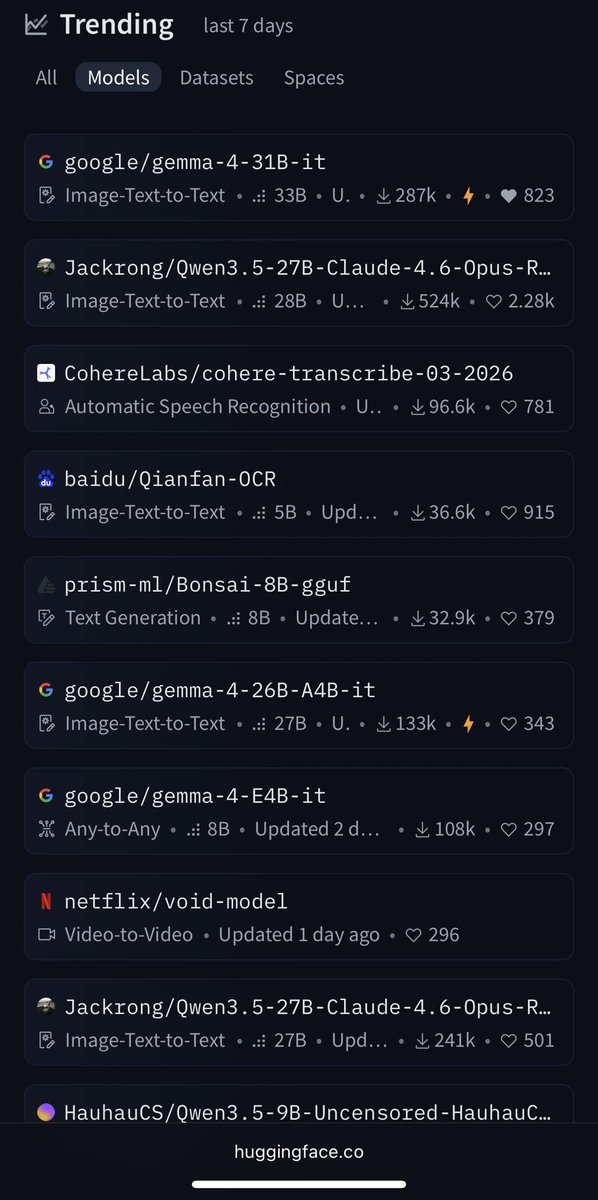
Gemma 4 Becomes Top Trending Model on Hugging Face
By
–
Gemma 4 is the #1 trending model on @huggingface 🤗
→ View original post on X — @clementdelangue, 2026-04-04 20:37 UTC
-
Claude API Usage Policy and Overages Now Clearly Defined
By
–
Yep API is fully supported, as well as overages for Claude logins. This was always the case in our terms and docs, but since it was recommended in some other products’ 3p docs, a lot of folks didn’t realize it’s not allowed. Hoping the new way is less footgunny for people.
-
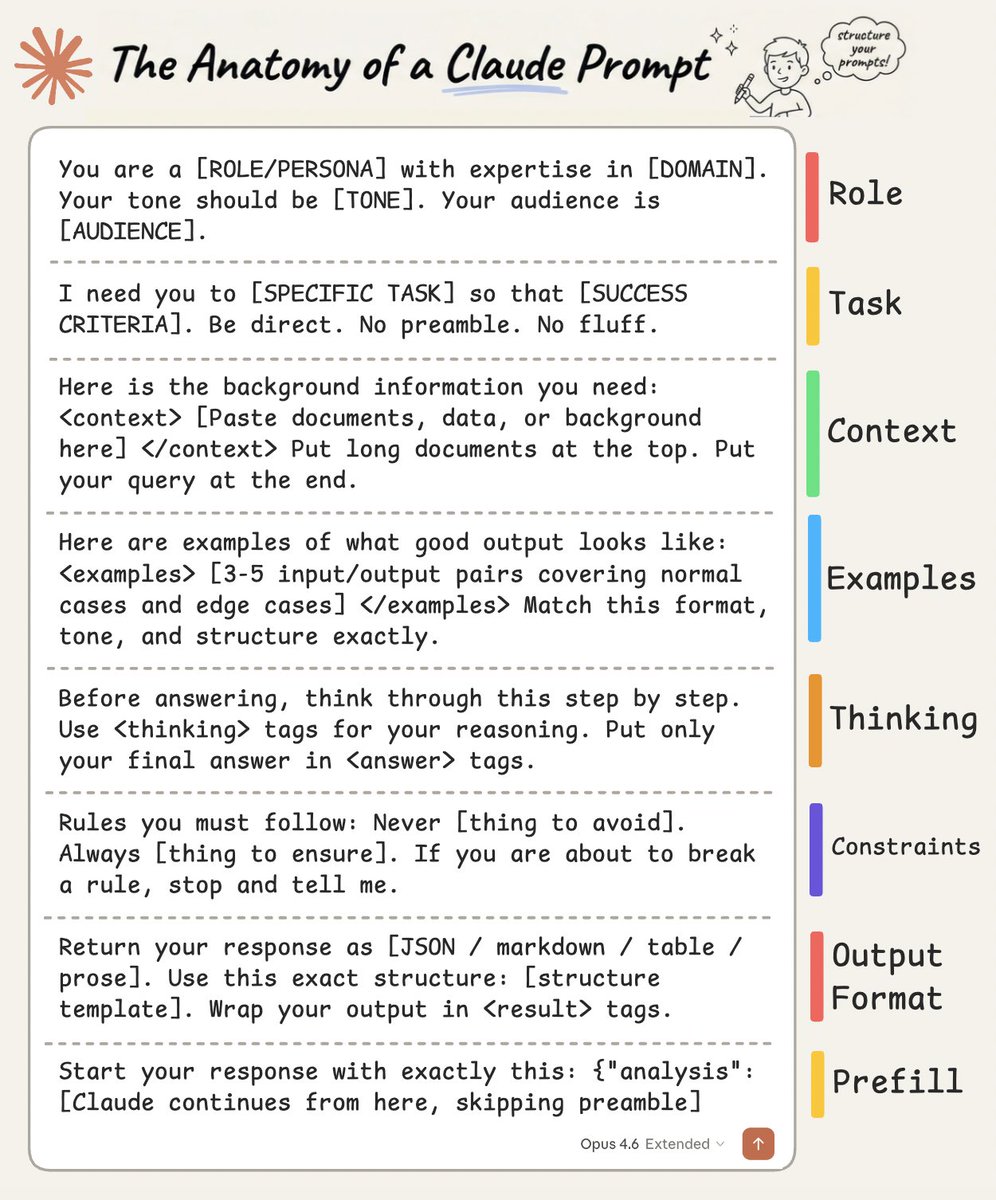
8 Building Blocks of Effective Claude Prompts
By
–
If you found it insightful, reshare with your network. Find me → @akshay_pachaar ✔️ For more insights and tutorials on LLMs, AI Agents, and Machine Learning! nitter.net/akshay_pachaar/status/… Akshay 🚀 (@akshay_pachaar) The anatomy of a Claude prompt: The difference between a mediocre Claude output and a great one almost always comes down to how you structure your prompt. Not the specific words you choose. Not some secret phrasing. Just a clear, repeatable structure that gives Claude exactly what it needs to do the job well. Here's how a well-built Claude prompt breaks down into 8 building blocks, each doing one job: 1️⃣ Role Tell Claude who it is before telling it what to do. "You are a [ROLE] with expertise in [DOMAIN]. Your tone should be [TONE]. Your audience is [AUDIENCE]." Setting a role in the system prompt changes how Claude reasons, what it prioritizes, and how it communicates. A "senior backend engineer" writes differently than a "technical copywriter," and Claude picks up on that distinction immediately. 2️⃣ Task State what you want and what success looks like, in the same breath. "I need you to [SPECIFIC TASK] so that [SUCCESS CRITERIA]." The "so that" part is what people skip, and it's the part that matters. It gives Claude a way to evaluate its own output. Without it, Claude is guessing what "good" means. Be direct, skip the preamble, and cut the fluff. 3️⃣ Context This is where you feed Claude everything it needs to do the job well. Wrap it in XML tags like <context> and </context>, then paste your documents, data, or background inside. One thing that dramatically improves quality: put long documents at the top of your prompt and your actual query at the end. Anthropic's own testing shows this can improve response quality by up to 30%, especially with complex, multi-document inputs. 4️⃣ Examples Nothing steers output quality like showing Claude what "good" looks like. Provide 3-5 input/output pairs. Cover normal cases AND edge cases. Wrap them in <examples> tags so Claude doesn't confuse them with instructions. Claude pays extremely close attention to examples. If your example has a quirk you didn't intend, Claude will replicate it. So make sure every example models the behavior you actually want. 5️⃣ Thinking For anything requiring reasoning, analysis, or multi-step logic, ask Claude to think before answering. "Before answering, think through this step by step. Use <thinking> tags for your reasoning. Put only your final answer in <answer> tags." This separates the messy reasoning from the clean output. You get to see how Claude arrived at its answer without that reasoning cluttering the final result. 6️⃣ Constraints Every good prompt has guardrails. "Never [thing to avoid]. Always [thing to ensure]. If you are about to break a rule, stop and tell me." That last line is underrated. It turns Claude into a collaborator instead of a blind executor. Instead of silently violating a constraint, Claude flags the conflict and lets you decide. 7️⃣ Output Format Don't leave the format to chance. "Return your response as [JSON / markdown / table / prose]. Use this exact structure: [structure template]." If you want JSON, show the exact schema. If you want markdown, show the heading structure. If you want a table, define the columns. The more specific you are about shape, the less time you spend reformatting afterward. 8️⃣ Prefill This one is API-specific, but incredibly powerful. You can pre-fill the start of Claude's response to skip preamble and lock in the format. Claude will continue from exactly where you left off. No "Sure, I'd be happy to help!" opening, no throat-clearing, just clean output from the first token. Here's the thing people get wrong about prompting: they think it's about finding the right words. It's actually about giving Claude the right structure. If you want to go deeper, I wrote a detailed article covering the anatomy of the .claude/ folder, a complete guide to CLAUDE(.)md, hooks, skills, agents, and permissions, and how to set them all up properly. Link in the next tweet. — https://nitter.net/akshay_pachaar/status/2040414818696634635#m
→ View original post on X — @akshay_pachaar, 2026-04-04 20:24 UTC
-
Claude CLI Mode Feature Discussion and Design Critique
By
–
but why make this a new feature? this is what the claude-cli mode should do.
-

Unsloth AI launches MLX Dynamic Quants for Gemma-4
By
–
Wait, what? @UnslothAI is starting to upload MLX Dynamic Quants! I have to test them ASAP! Thanks you really rock! 🚀 unsloth.ai/docs/models/gemma…
→ View original post on X — @huggingface, 2026-04-04 19:48 UTC