I Built a Free Open Source Offline Transcription App — Here's How https://
madebyagents.com/blog/free-open
-source-offline-transcription-app-echos?utm_source=dlvr.it&utm_medium=twitter
… #ArtificialIntelligence #MachineLearning #DataScience #DataEngineering #CloudComputing #MLOps #Innovation #BusinessStrategy
SOFTWARE
-

Free Open Source Offline Transcription App Built with AI
By
–
-

Agentic Engineering in Production: Closing the AI Gap
By
–
The same gap that broke data science in the 2010's is back — and it's moving faster. Learn what agentic engineering actually looks like in production. April 15 @ 1PM ET. Register now → https://
hubs.ly/Q048SdZn0 -
PokeeClaw: Securing Local AI Assistants with Isolated Sandbox
By
–
OpenClaw has proven that local AI assistants have product-market fit. But the big issue with them has been security.
— François Chollet (@fchollet) 30 mars 2026
The team at @Pokee_AI is fixing it with PokeeClaw: works like OpenClaw, but with in a secure sandbox architecture with isolated environments, approval workflows,… https://t.co/7Q5cmQJbzhOpenClaw has proven that local AI assistants have product-market fit. But the big issue with them has been security. The team at @Pokee_AI is fixing it with PokeeClaw: works like OpenClaw, but in a secure sandbox architecture with isolated environments, approval workflows,
-
AI Tools Democratization Drives Need for Business Differentiation
By
–
In a world where everyone can build websites, apps and features easily (thank you Cursor, Lovable, Claude and the likes), it will take more for you and your company to differentiate themselves (which is in my opinion the basis for success). That's why we're seeing more and more
-
Running Operational Workloads with Lakebase, Databricks Apps, Agents
By
–
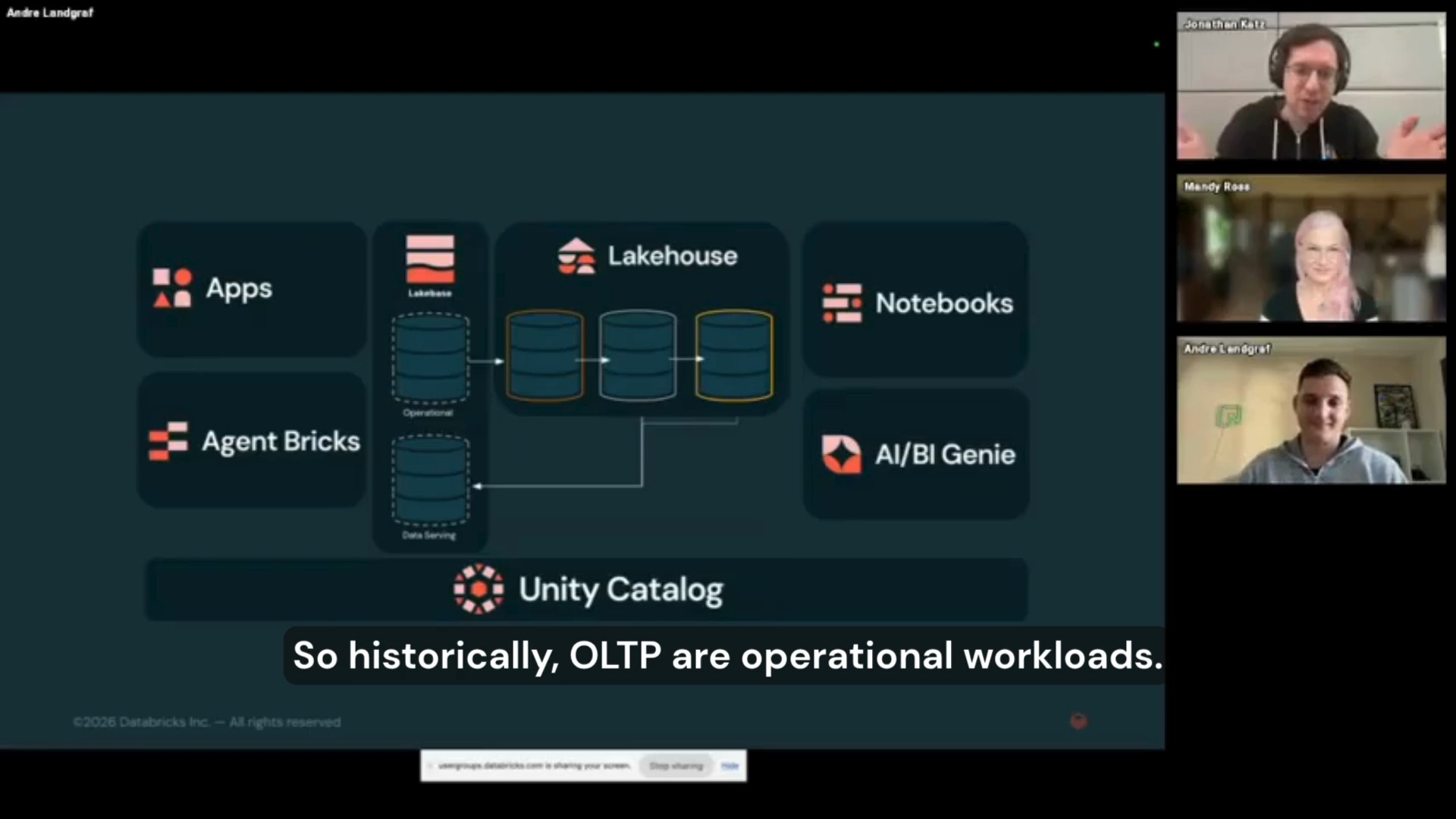
See how to run operational workloads on the lakehouse using Lakebase, Databricks Apps, and Agent Bricks. This BrickTalks session covers how teams are building data apps and AI agents on top of serverless Postgres to automate workflows and make data usable in real applications.
-
llama.cpp reaches 100k stars, local AI movement thriving
By
–

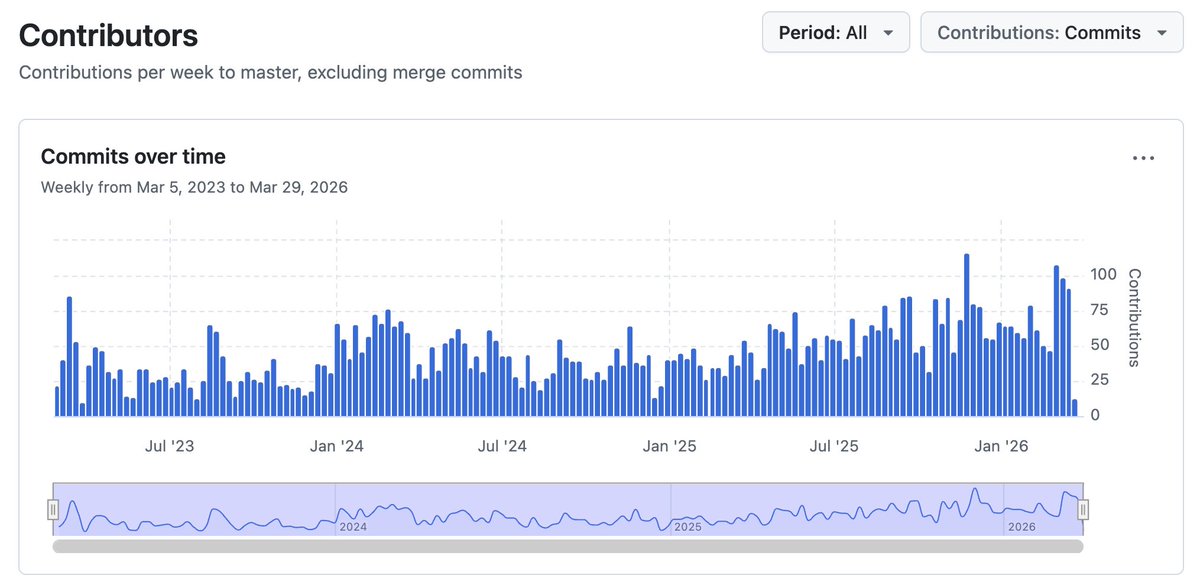
llama.cpp at 100k stars now that 90% of the code worldwide is being written by AI agents, I predict that within 3-6 months, 90% of all AI agents will be running locally with llama.cpp 😄 Jokes aside, I am going to use this small milestone as an opportunity to reflect a bit on the project and the state of AI from the perspective of local applications. There is a lot to say and discuss and yet it feels less and less important to try to make a point. Opinions about viability of local LLMs are strongly polarized, details are overlooked, the scientific approach is lacking. Arguments are predominantly based on vibes and hype waves. One thing is clear though – local LLMs are used more and more. I expect this trend to continue and likely 2026 will end up being one of the most important years for the local AI movement. I admit that I didn't expect the agentic era to come so quickly to the local LLM space. One year ago, the available models were too computationally expensive for doing long-context tasks. There wasn't an obvious path towards meaningful agentic applications. The memory and compute requirements were huge. Last summer, with the release of gpt-oss, things started to change. It was the first time we saw a glimpse of tool calling that actually works well within the resource constraints of our daily devices. Later in the year, even better models were released and by now, useful local agentic workflows are a reality. Comparing local vs hosted capabilities at a given moment of time is pointless. To try put things into perspective: – We don't need frontier intelligence to automate searches and sending emails – We don't need trillion parameter models to be able to summarize articles or technical documents – We don't need massive GPU data centers to control our home appliances or turn the lights off in the garage I believe that there is a certain level of intelligence we as humans can comprehend and meaningfully utilize to improve our working process. Beyond that level, access to more intelligence becomes unnecessary at best and counterproductive at worst. I also believe that that level of useful artificial intelligence is completely within reach locally and it has always been just a matter of implementing the right software stack to bring it to the end user. With llama.cpp, I am confident that we continue to be on the right track of building that software stack! The llama.cpp project is going stronger than ever. With more than 1500 contributors, the project keeps growing steadily. From technical point of view, I think that llama.cpp + ggml is the only solution that actually makes sense. That is, the software stack must run efficiently on every possible device, hardware and operating system. The technology is too important to be vendor-locked. It has to be developed in the open, by the community, together with the independent hardware vendors. This is the only right way to build something that will truly make a difference in the long run. I won't try to convince you about what is currently and will be possible with local AI. We will just continue to build as usual. I am confident that after the smoke clears and we look objectively at what we have built together, the benefits will be obvious to everyone. Big shoutout to all llama.cpp maintainers. I feel extremely lucky to be able to work together with so many talented contributors. Every day I learn something new and I feel there is so much more cool stuff that we are going to build. Also, I am really thankful that the project continues to have reliable partners to support it! Cheers!
-

CAID: Multi-Agent Coordination Improves Coding Task Accuracy
By
–
NEW research from CMU. (bookmark this one) The biggest unlock in coding agents is understanding strategies for how to run them asynchronously. Simply giving a single agent more iterations helps, but does not scale well. And multi-agent research shows that coordination > compute. A new paper from CMU proves this with a practical multi-agent system. CAID (Centralized Asynchronous Isolated Delegation) borrows proven human SWE practices: a manager builds a dependency graph, delegates tasks to engineer agents who work in isolated git worktrees, execute concurrently, self-verify with tests, and integrate via git merge. CAID improves accuracy over single-agent baselines by 26.7% absolute on paper reproduction tasks (PaperBench) and 14.3% on the Python library development tasks (Commit0). The key insight is that isolation plus explicit integration beats both single-agent scaling and naive multi-agent approaches. For long-horizon software engineering tasks, multi-agent coordination using git-native primitives should be the default strategy, not a fallback. Paper: arxiv.org/abs/2603.21489 Learn to build effective AI agents in our academy: academy.dair.ai/
→ View original post on X — @debashis_dutta, 2026-03-30 14:41 UTC
-
New local 2GB nanochat model Mr. Chatterbox released
By
–
Mr. Chatterbox is a new 2GB nanochat model trained from scratch by Trip Venturella on "28,000 Victorian-era British texts published between 1837 and 1899" – I released an llm-mrchatterbox plugin which can run it locally on my Mac
-
Claude vs Claude Code vs Cowork: Which Tool to Use When
By
–
Claude vs. Claude Code vs. Cowork. If you've been confused about which one to use and when, this post will clear that up in under two minutes. Anthropic now offers three distinct ways to interact with Claude, and each one targets a fundamentally different workflow. Think of it as: Chat for thinking, Code for building, and Cowork for doing. Here's a quick breakdown: 1️⃣ Claude Chat This is the conversational AI assistant most people already know. You type a prompt, Claude responds, and you iterate together. – Turn rough ideas into structured plans through conversation – Write emails, reports, essays, and long-form content – Research and summarize complex topics in minutes – Analyze documents, PDFs, and images – Build interactive prototypes through Artifacts The key here is that everything happens through conversation. You're thinking with Claude, not delegating work to it. It's available on every device, has a free tier, and supports persistent memory across sessions. The tradeoff is that it has no direct access to your local files (upload only), and it can't generate raster images natively. 2️⃣ Claude Code This is a terminal-native coding agent. You describe what you want in plain English, and Claude reads your codebase, writes code, runs tests, fixes errors, and ships the result. – Build and debug entire features across the full codebase – Write, run, and fix tests automatically – Manage git workflows and create pull requests – Spawn multiple parallel agents working on different parts of a task simultaneously It handles the full development cycle end to end, from planning to execution to testing. With the CLAUDE(.)md configuration file, you can teach it your project's conventions, patterns, and constraints so it writes code the way your team expects. The tradeoff is a steeper learning curve compared to Chat, and token costs can add up during heavy sessions. 3️⃣ Claude Cowork This is the newest addition. Anthropic describes it as Claude Code for the rest of your work. It's an agentic desktop assistant that automates file management and repetitive tasks through a GUI. You describe an outcome, and Claude plans, executes, and delivers finished work: formatted documents, organized file systems, spreadsheets with working formulas, and synthesized research. – Direct local file access and editing (no upload/download cycle) – Schedule recurring tasks automatically – Assign tasks remotely via Dispatch from your phone – Computer Use lets Claude control your screen directly It runs inside a sandboxed virtual machine on your computer, so Claude can only access folders you explicitly grant. You don't need to know how to code to use it. The tradeoff is that your computer must stay awake for tasks to run, and it's still in research preview. Here's how to think about choosing between them: → If you need to think through a problem or get writing/research help, use Chat → If you're building software and want an autonomous coding partner, use Code → If you have a clearly defined deliverable that involves local files and desktop workflows, use Cowork All three are included in the same subscription starting at $20/month, which makes it one of the highest-leverage subscriptions in productivity software right now. I've put together a visual below that maps the workflow of each product side by side. If you want to go deeper into Claude Code specifically, I wrote a detailed article covering the anatomy of the .claude/ folder, a complete guide to CLAUDE(.)md, custom commands, skills, agents, and permissions, and how to set them all up properly. Link in the next tweet.
→ View original post on X — @akshay_pachaar, 2026-03-30 13:15 UTC