Prompt 5: "The JTBD Demand Detector" "For the strongest opportunity you identified, apply
Clayton Christensen's Jobs-to-Be-Done framework. Research what 'job' the target user is actually hiring
a product to do. Not features. The underlying progress
they're trying to make.
@godofprompt
-
Apply JTBD Demand Detector to an AI Opportunity
By
–
-
Incumbent Weakness Mapper: Competitor Analysis Prompt
By
–
Prompt 3: "The Incumbent Weakness Mapper" "Take the top 5 pain points from your research. For each one, do deep research on every existing
product that claims to solve it. For each competitor, I need: their pricing model, the
most common user complaints, specific feature gaps -
Prompt: Pain Point Mining for AI/Niche Tools
By
–
Prompt 2: "The Pain Point Miner" "Based on the [NICHE] projects you just found, I need
you to do deep research on the complaints and unmet
needs people are expressing around these tools and
this space in general. Search Reddit threads, X posts, Product Hunt comment
sections, -
Build Trend Scanner: Research Recent AI Products
By
–
Prompt 1: "The Build Trend Scanner" "I'm interested in [YOUR NICHE, e.g. productivity tools,
developer tools, AI wrappers, personal finance]. Do deep research on what solo developers and indie
builders have shipped in this space in the last 90 days. Search Product Hunt -
AI image/video tools tighten filters during risky project
By
–
Six months ago you could generate almost anything with AI image and video tools.
— God of Prompt (@godofprompt) 21 mai 2026
That window is closing fast.
A creator recently stress-tested Nano Banana Pro, Kling, and Seedance 2.0 on this RISKY video project.
Midway through production, Seedance 2.0 tightened its filters so… pic.twitter.com/09Tazae4eTSix months ago you could generate almost anything with AI image and video tools. That window is closing fast. A creator recently stress-tested Nano Banana Pro, Kling, and Seedance 2.0 on this RISKY video project. Midway through production, Seedance 2.0 tightened its filters so
-
The Evolution of AI from Answering to Acting Agents
By
–
The pattern across every announcement: Google is moving from AI that answers to AI that acts. Agents that monitor. Agents that shop. Agents that manage your inbox. A compute model that charges for what you use, not how many times you click send. Whether you're building on
-
Google integrates voice-driven AI modes into Gmail, Docs, and Keep
By
–
Gmail and Docs are getting voice-driven AI modes. Gmail Live lets you search and interact with your emails conversationally on mobile. Docs Live lets you create and edit documents by talking to them. Google Keep gets the same treatment. Speak your thoughts, and it organizes
-
Google Launches AI-Powered Information Agents for Real-Time Monitoring
By
–
This is the one that should get your attention.
— God of Prompt (@godofprompt) 20 mai 2026
Google is launching information agents that work in the background 24/7.
You set a question. The agent monitors blogs, news sites, social posts, and real-time data across finance, shopping, and sports. It alerts you when something… https://t.co/K1eqNxIBmMThis is the one that should get your attention. Google is launching information agents that work in the background 24/7. You set a question. The agent monitors blogs, news sites, social posts, and real-time data across finance, shopping, and sports. It alerts you when something
-

Google shifts to compute-based usage model for AI prompts
By
–
Google is replacing daily prompt limits with a compute-based usage model. Simple text prompts use less compute. Complex video or coding prompts use more. Limits refresh every five hours until your weekly cap. This is a better model for power users who mix light and heavy tasks.
-
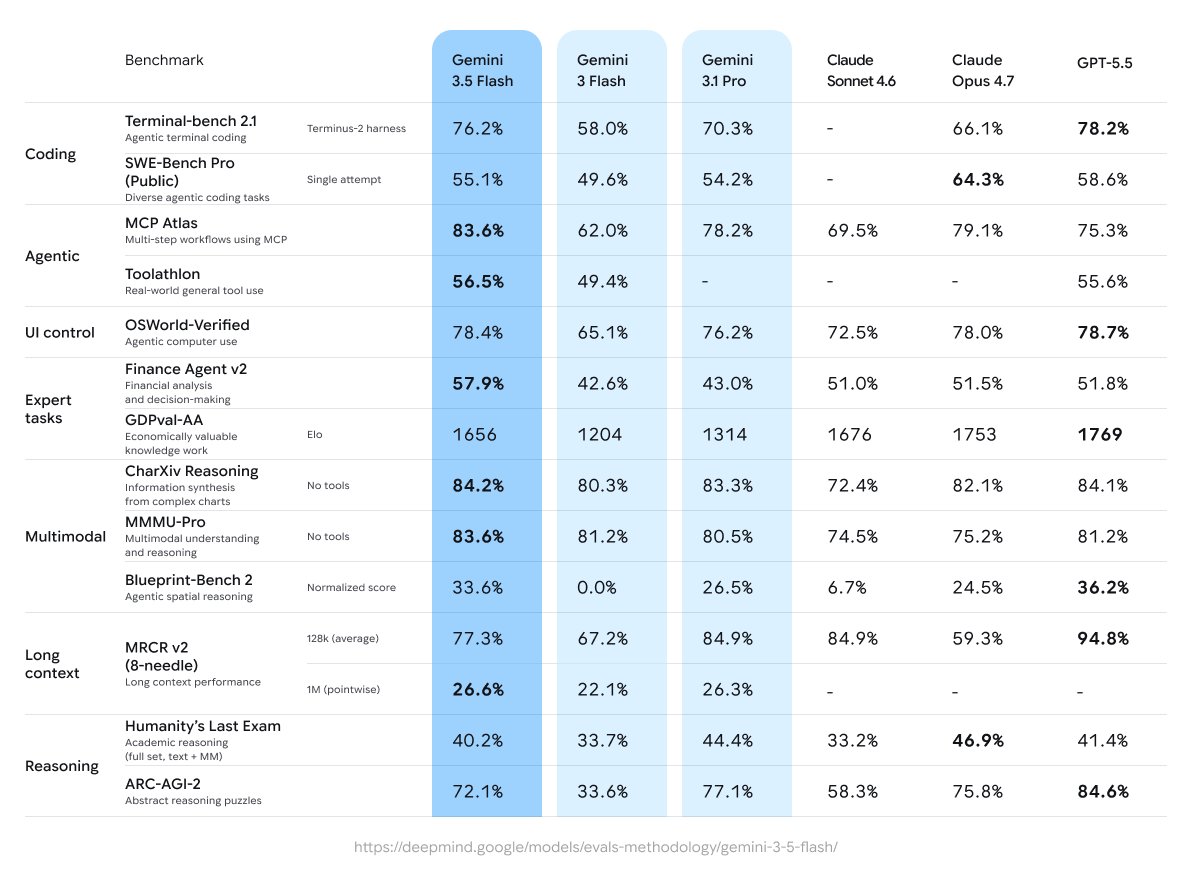
Gemini 3.5 Flash Released with Improved Performance Benchmarks
By
–
Gemini 3.5 Flash is the new default model. It beats 3.1 Pro across coding, agentic, and multimodal benchmarks while running 4x faster than other frontier models in output tokens per second. Available now in the Gemini app, Search, Antigravity 2.0, and the API. 3.5 Pro is in