They are not designed for people to invoke them, although you can do so if you wish. Simply tell the model what you want to happen, and it will do the work to invoke the right skills for you.
@bcherny
-
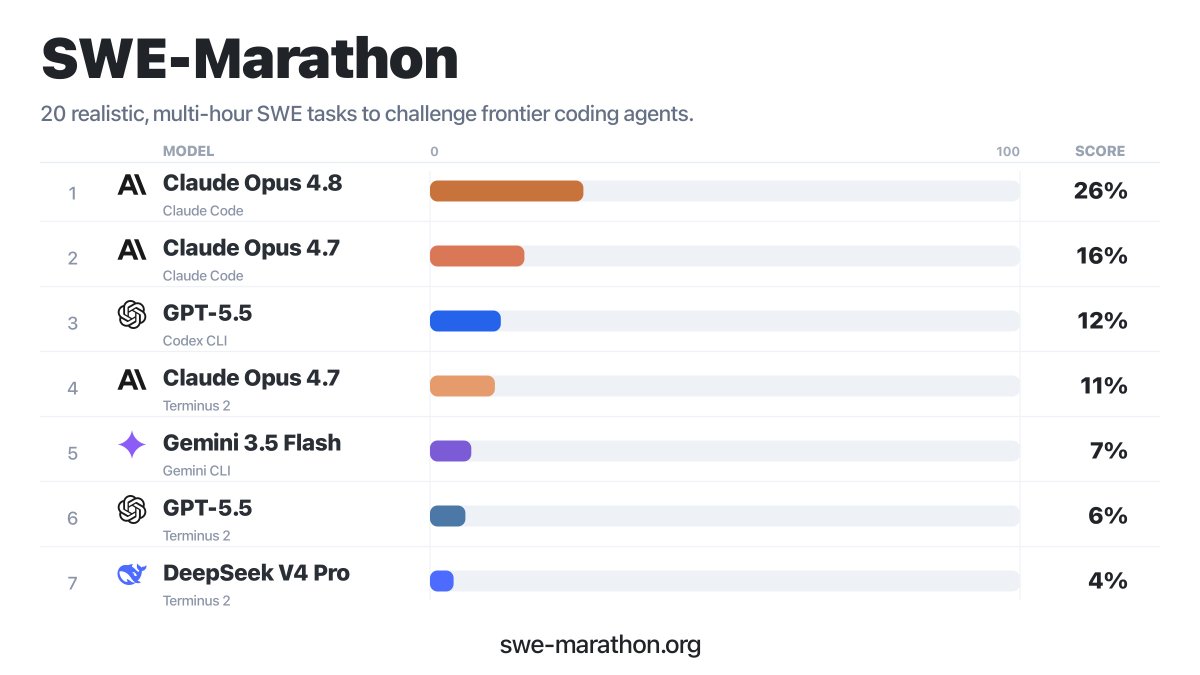
Opus best model for long tasks: autonomous execution tips
By
–
Observation of many benchmarks showing that Opus is the best model for long tasks. Five tips for running Opus autonomously for hours/days: 1. Use automatic mode for permissions so that Claude does not ask for approval.
-
AI Agents Transform Workflows and Organizational Structure
By
–
The teams seeing the biggest wins from AI are completely changing how they work, not speeding up what they already do. What steps can you delete, what handoffs go away, what can an agent just own end to end. Great to see Salesforce go this deep. Shoutout to Srini, @Benioff &
-
AI Agents Improve Code Quality Without Sacrificing Productivity
By
–
Quality went up alongside output. Even with more PRs shipping, total incidents dropped 5%. They built security guardrails and quality standards into the agentic workflow itself. Productivity vs quality is sometimes framed as a tradeoff. They're not seeing it.
-
Salesforce: Claude Code Agents Cut Migration Time 95%
By
–
Salesforce published a detailed writeup on going agentic with Claude Code. A couple things jumped out. A migration they'd scoped at 231 days shipped in 13. One PR delivered 21 endpoints at 100% test coverage.
-
Claude Code Ships Dynamic Workflows for Complex Tasks
By
–
We also shipped dynamic workflows in Claude Code (research preview), for tasks too big for one pass. Make sure to default to auto mode so Claude isn't stopping for permissions. It's token-intensive, so save it for your biggest jobs: migrations, refactors, perf optimization,
-
Claude Dynamic Workflows Accelerate Code Migrations
By
–
Big migrations and refactors are some of a team's most important work, and the easiest to push off to a "better time" since they'd tie up engineers for a quarter. With dynamic workflows, Claude can now land that kind of work in days or weeks. More:
-
Claude 4.8 Defaults to High Effort, Improved Coding Performance
By
–
4.8 defaults to high effort, which spends about the same tokens as 4.7's default on coding but performs better. For hard problems and long-running async work, switch to xhigh. We've raised Claude Code rate limits to cover the extra tokens.
-

Claude Opus 4.8 Released: Stronger Coding Model with Benchmarks
By
–
Claude Opus 4.8 is out today. It's our strongest coding model yet: up on SWE-bench Pro (from 64.3 to 69.2) and noticeably more honest about its own work. It tells you when it's unsure and catches its own bugs instead of declaring victory early. Same price as 4.7.
-
AI Internal States Mirror Human Neuroscience Findings
By
–
> … [W]e keep finding things that are mysterious, even unsettling. We find structures that mirror results from human neuroscience. We find evidence of introspection. We find internal states that functionally mirror joy, satisfaction, fear, grief, and unease. I don’t know what