Next, open up your Claude Desktop configuration file: – macOS: ~/Library/Application Support/Claude/claude_desktop_config.json – Windows: %APPDATA%Claudeclaude_desktop_config.json
CODE
-
Connect Claude to Internet Search Engine Using MCP
By
–
I just connected Claude to an internet search engine using MCP.
— Alex Albert (@alexalbert__) 25 novembre 2024
Here's how you can do it too in under 5 minutes: pic.twitter.com/IT4j4AidXwI just connected Claude to an internet search engine using MCP. Here's how you can do it too in under 5 minutes:
-
Using existing open source code for development
By
–
It’s open source, I’m telling him to use the existing code.
-
OpenAI manifest files enable local system integration via plugins
By
–
i dont think openai had a desktop at the time, but you could put anything you wanted behind their manifest files, eg https://
openai.com/index/chatgpt-
plugins/#browsing
… to connect to local retrieval systems -
Using Claude to Learn MCP from Documentation
By
–
Feed all the docs into Claude as a plain text file and have Claude teach you about MCP: https://
modelcontextprotocol.io/llms-full.txt -
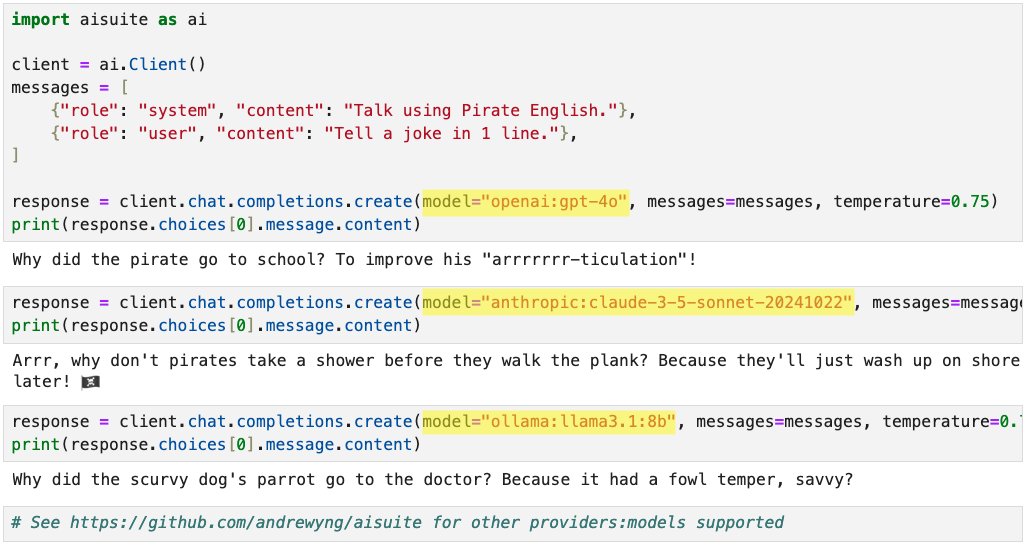
New Open-Source Python Package Simplifies LLM Integration
By
–
Announcing new open-source Python package: aisuite! This makes it easy for developers to use large language models from multiple providers. When building applications I found it a hassle to integrate with multiple providers. Aisuite lets you pick a "provider:model" just by
-
MCP: Open Standard for LLM Integrations Like LSP for IDEs
By
–
Like LSP did for IDEs, we're building MCP as an open standard for LLM integrations. Build your own servers, contribute to the protocol, and help shape the future of AI integrations:
-
Get Started with MCP in Under 5 Minutes Quick Guide
By
–
Get started with MCP in <5 minutes – we've built servers for GitHub, Slack, SQL databases, local files, search engines, and more. Install the Claude Desktop app and follow our step-by-step guide to connect your first server: http://
modelcontextprotocol.io/quickstart -
MCP: Universal Protocol Connecting AI to Any Data Source
By
–
We're building a world where AI connects to any data source through a single, elegant protocol—MCP is the universal translator. Integrate MCP once into your client and connect to data sources anywhere.
-
MCP Remote Server Support Coming with Enterprise Authentication
By
–
Right now, MCP is only supported locally – servers must run on your own machine. But we're building remote server support with enterprise-grade auth, so teams can securely share their context sources across their organization.