More on how Notion built it with the Cursor SDK:
TOOLS
-
Cursor delegates tasks to Notion via SDK for cloud agents
By
–
You can now delegate tasks to Cursor directly from Notion.
— Cursor (@cursor_ai) 24 juin 2026
It's built on the Cursor SDK, so every cloud agent runs on the same models, harness, and runtime that power Cursor.
@Cursor on any spec or assign it a task to open a PR your whole team can review. pic.twitter.com/1LH9SERN2KYou can now delegate tasks to Cursor directly from Notion. It's built on the Cursor SDK, so every cloud agent runs on the same models, harness, and runtime that power Cursor. @Cursor on any spec or assign it a task to open a PR your whole team can review.
-
@datachaz — 2026-06-24
By
–
* TEXT VERSION * SESSION CONTROL
/clear → Wipes the slate clean for a fresh context window.
/rename [name] → Renames your session (leave blank to let Claude name it!).
/rewind → Undoes recent steps by rolling back to a checkpoint.
/resume [session] → Jumps back into an -
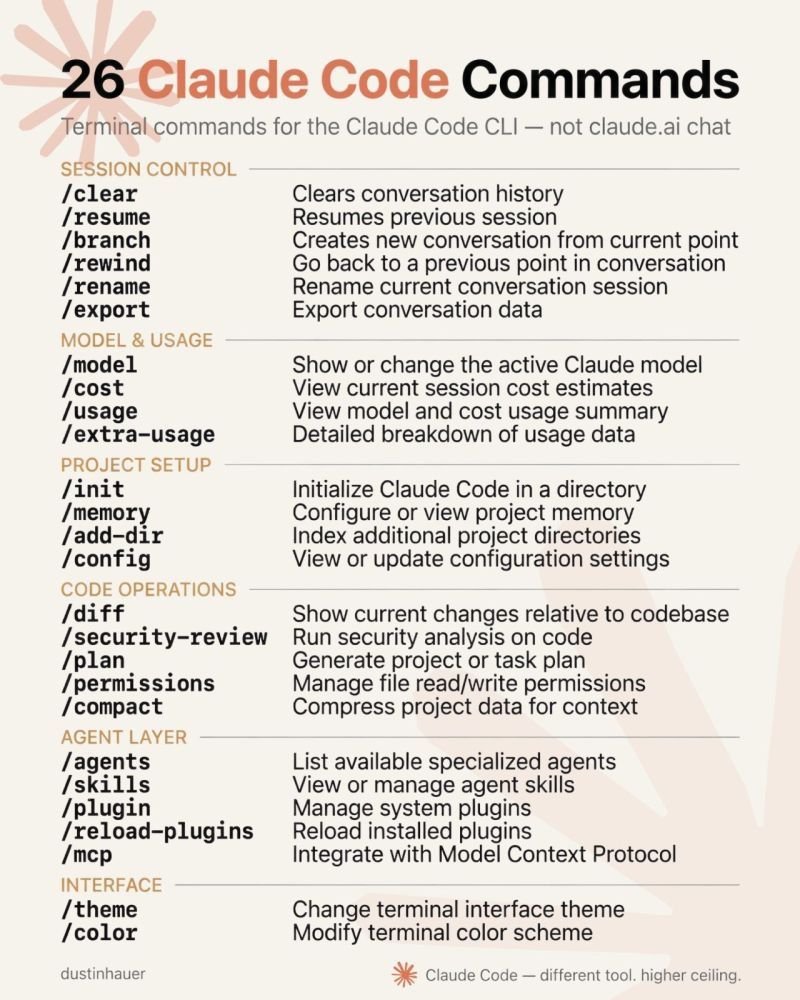
26 slash commands every power user needs to know
By
–
Want to master Claude Code? Here are 26 slash commands every power user needs to know. Save this list to supercharge your AI coding workflow ↓
-
One CLAUDE.md and auto memory simplify workflows
By
–
8/ The real setup. One lean CLAUDE.md. Let auto memory handle lessons. Add path rules when it grows, skills for workflows. Most people manage 7 files to do what one file and the tool already handle. Source: Anthropic Claude Code documentation, 2026.
-
Path-scoped rules keep Claude’s context clean for big codebases
By
–
6/ For a big codebase, do not pile everything into one file. Use path-scoped rules in a .claude/rules/ folder. They load only when Claude touches the matching part of your code, so the context stays clean instead of carrying everything at once.
-
Claude Code auto memory makes lessons.md obsolete
By
–
5/ The lessons.md file is now pointless. Claude Code has auto memory, on by default. It writes down what it learns about your project on its own after you correct it, and reloads it next session. The tool already does it for you.
-
Start with one file: CLAUDE.md for project rules
By
–
3/ Start with one file. CLAUDE.md in your project root. Build commands, your folder layout, conventions, the "always do this" rules. Claude reads it at the start of every session. This one file does what those seven were trying to do.
-
Anthropic lists seven real ways to steer Claude Code
By
–
2/ Anthropic lists the real ways to steer Claude Code. There are seven, and they are not files you invent. CLAUDE.md. Rules. Skills. Subagents. Hooks. Output styles. System prompt.
That is the actual list. -
Claude Code auto-loads specific files, not viral advice files
By
–
1/ The viral advice says make persona.md, lessons.md, references.md, glossary.md, and more. Claude Code does not read most of them. It auto-loads a specific set of files. The rest just sit there unless you import them by hand.