2. Corey Schafer Best YouTube channel to learn Python! Corey explains every pythonconcept from scratch along with project based implementation. Check it out:
@sumanth_077
-
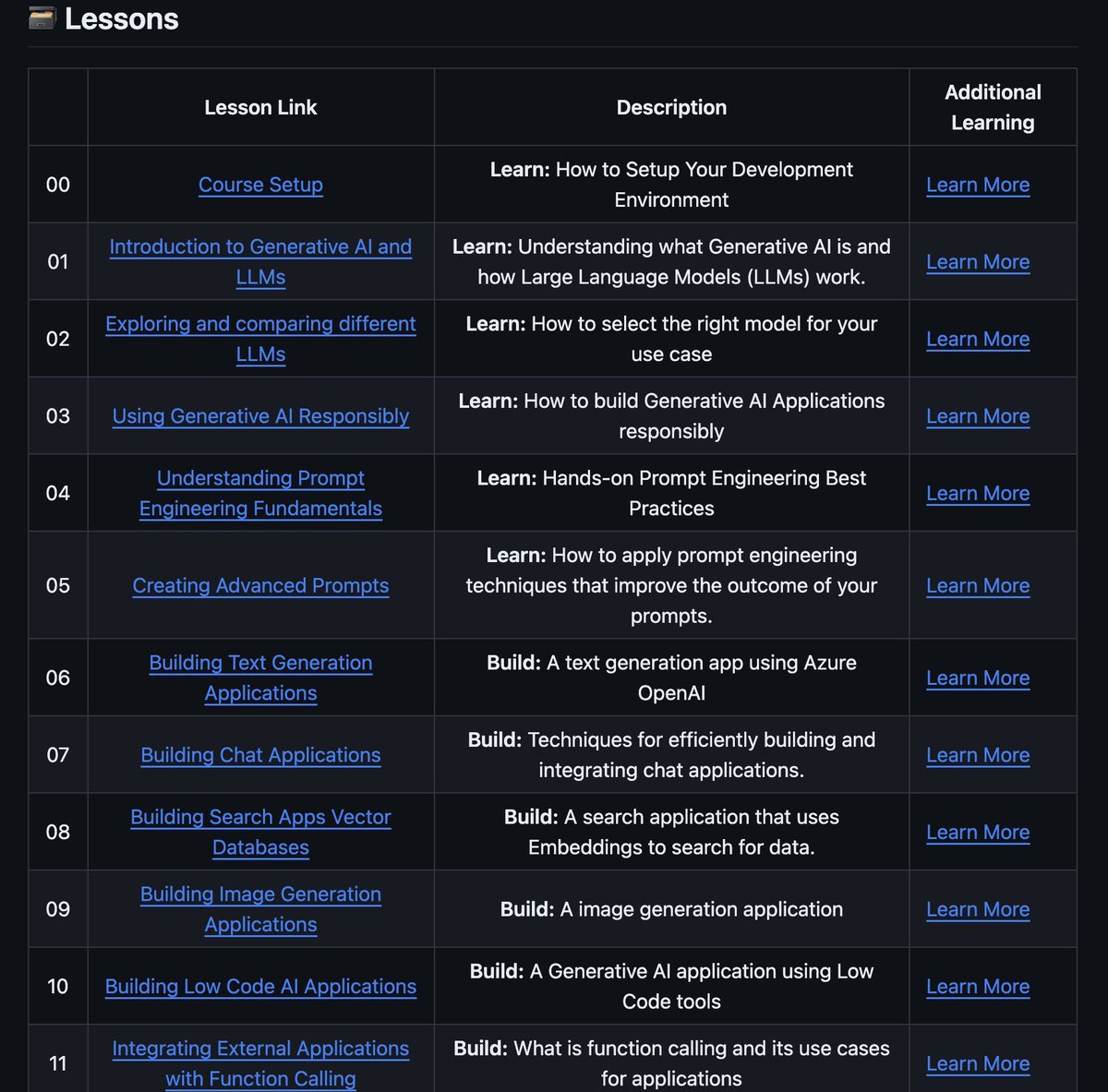
Microsoft Launches Free 18-Lesson Generative AI Course on GitHub
By
–
Microsoft launched the best course on Generative AI! The free 18 lesson course is available on Github and will teach you everything you need to know to start building Generative AI applications.
-
RAPIDS cuDF Library Now Integrated into Google Colab
By
–
Also their cuDF library will automatically know if you're running on GPU or CPU and speed up your processing. RAPIDS cuDF is now integrated directly into Google Colab. Checkout the Colab Notebook: https://
colab.research.google.com/github/rapidsa
i-community/showcase/blob/main/getting_started_tutorials/cudf_pandas_colab_demo.ipynb?ncid=ref-inor-594904
… Check out the Github Repo: -
Daily Content on Python, Data Science, Machine Learning, and LLMs
By
–
That's a wrap! If you are interested in any of these topics: – Python – Data Science – Machine Learning – Data Analysis – LLMs – MLOps Find me → @Sumanth_077 I'm sharing daily content over here.
-
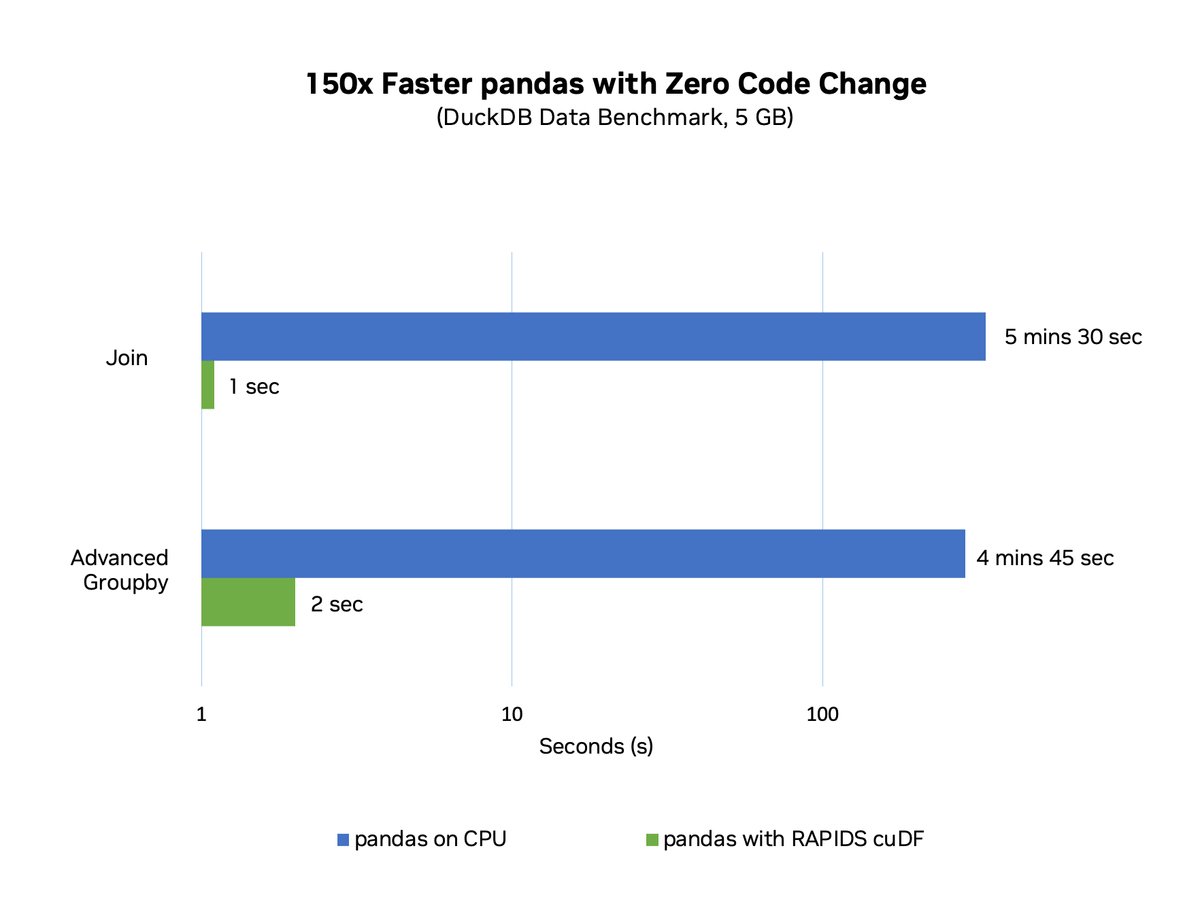
cuDF Pandas Accelerator: Accelerated Computing for Large Datasets
By
–
Pandas operates in-memory, as it loads the entire dataset into the local memory of the machine it is running on. This limits its ability to handle large datasets. With cuDF’s pandas accelerator you can now bring accelerated computing to pandas workflows.
-
NVIDIA accelerates Pandas 150x faster with minimal code changes
By
–
Pandas is a powerful data analysis and manipulation library for Python!
— Sumanth (@Sumanth_077) 26 juin 2024
NVIDIA just made Pandas 150x faster with zero code changes🔥
All you have to add is just a couple of lines of code:
%load_ext cudf.pandas
import pandas as pd pic.twitter.com/5JKqte1tppPandas is a powerful data analysis and manipulation library for Python! NVIDIA just made Pandas 150x faster with zero code changes All you have to add is just a couple of lines of code: %load_ext cudf.pandas
import pandas as pd -
Daily Content on Python, Data Science, Machine Learning, and MLOps
By
–
That's a wrap! If you are interested in any of these topics: – Python – Data Science – Machine Learning – Data Analysis – LLMs – MLOps Find me → @Sumanth_077 I'm sharing daily content over here.
-
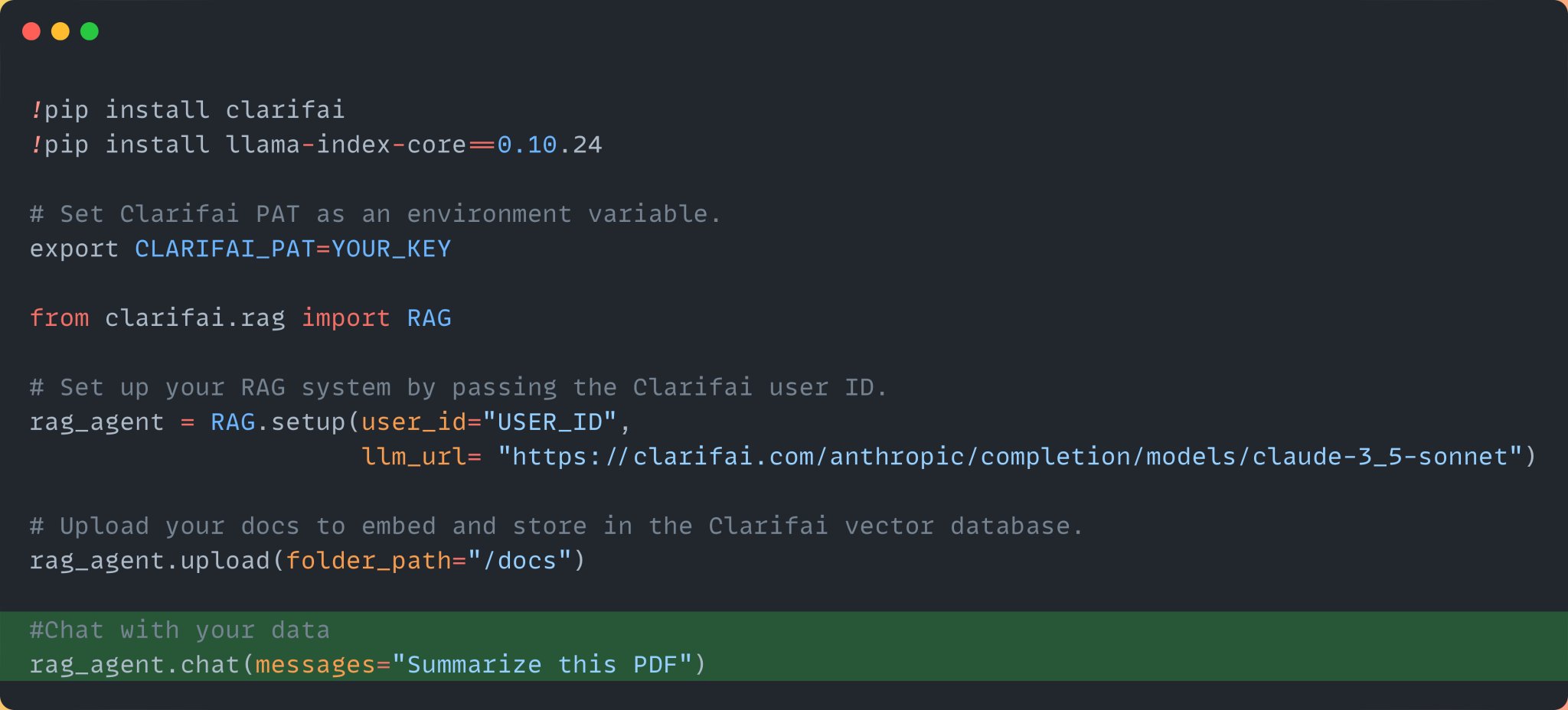
Chat with Your Data: Summarizing PDF Files
By
–
Step 4: Chat with your data Finally, once the data has been ingested into the app, chat with your data. Here we are asking it to summarize the pdf file.
-
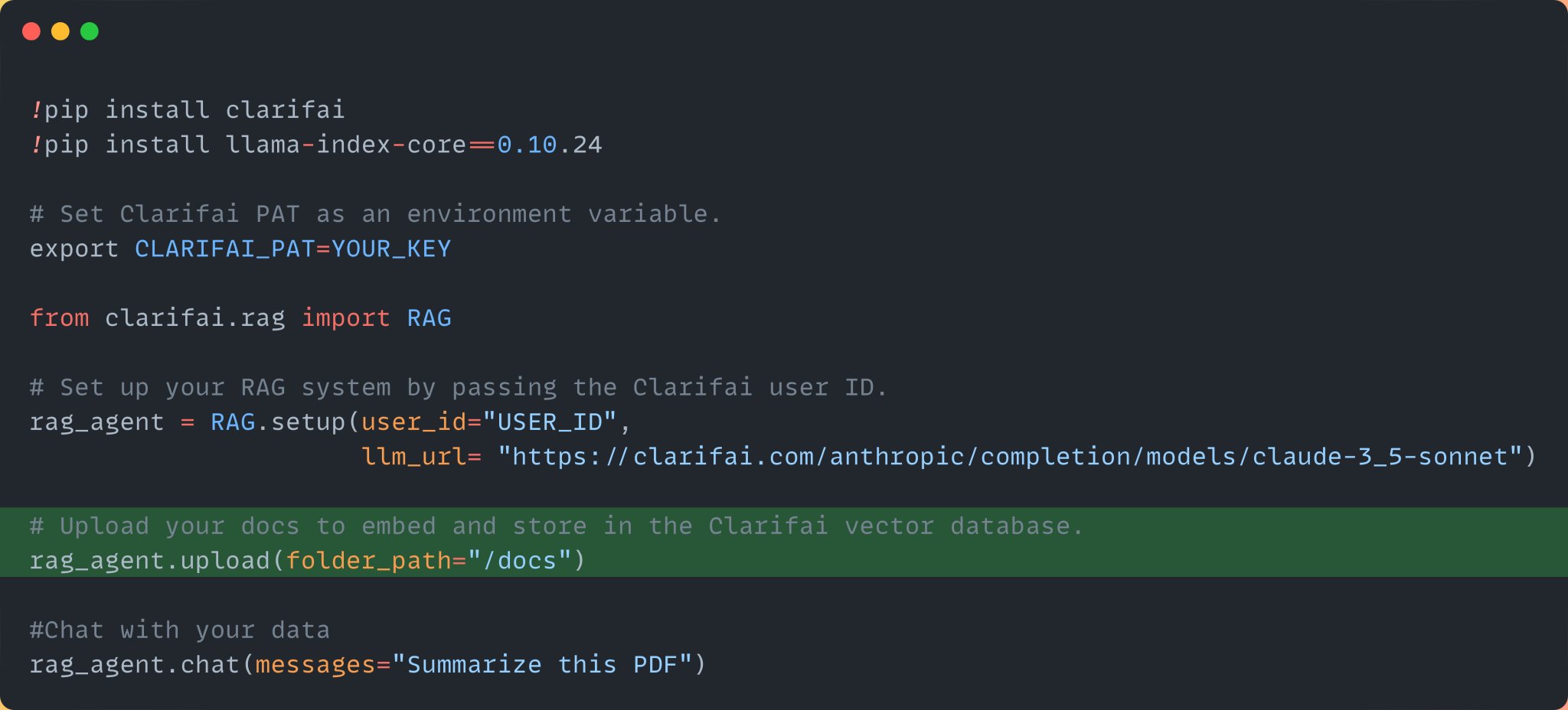
Upload PDF Research Paper Data to Clarifai App Vector Database
By
–
Step 3: Upload the data, Here we are uploading the pdf file of a research paper. Once you upload the data, it will embed and index the data into your Clarifai app. Clarifai Apps acts as your vector database.
-
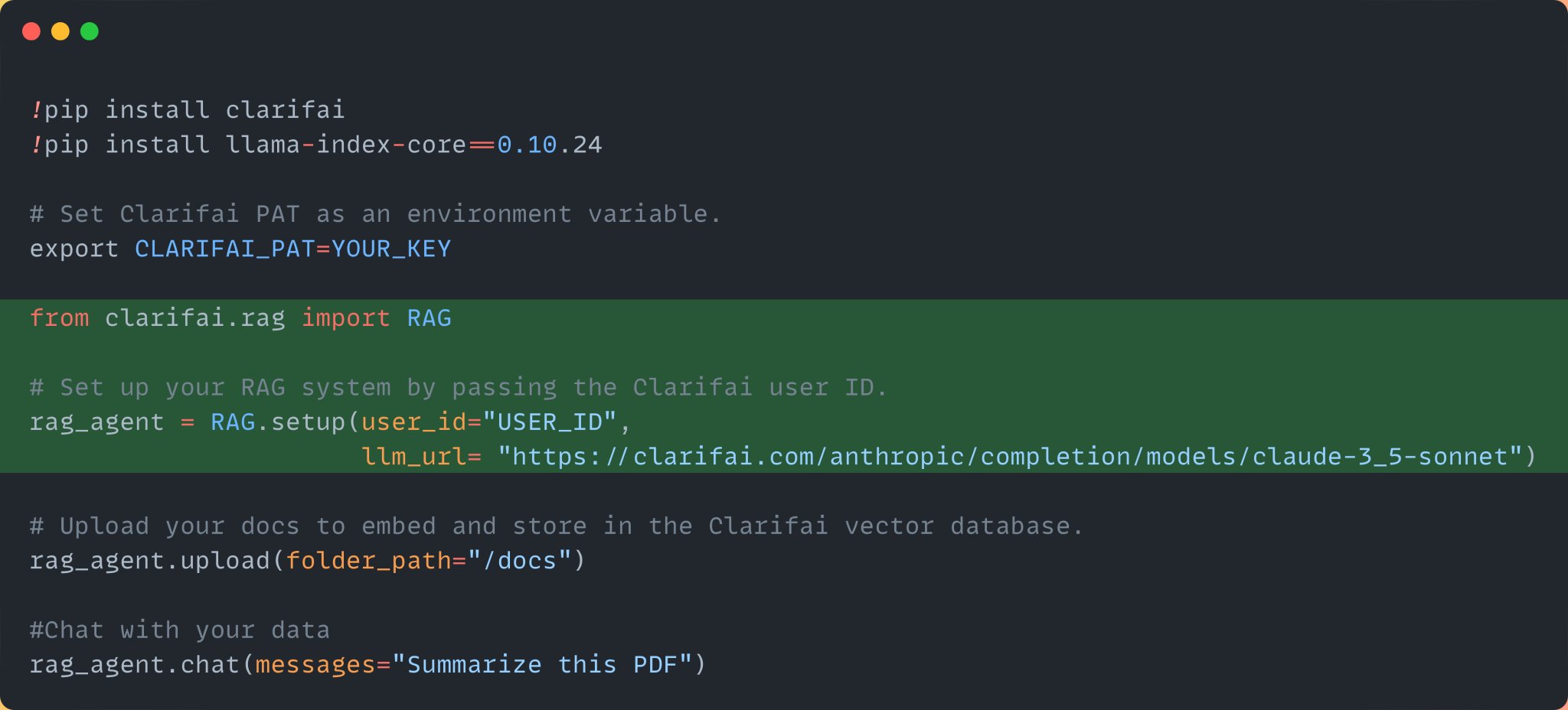
Setting up RAG system with Clarifai and Claude 3.5 Sonnet
By
–
Step 2: Next, import the RAG class and set up the RAG system by passing your Clarifai user ID and the Claude 3.5 Sonnet model URL from the Clarifai community. You can find it here: https://
clarifai.com/anthropic/comp
letion/models/claude-3_5-sonnet
… Once you sign up, you can find your user ID here: